
Introduction
GPT Imagine is an AI image generation tool built around GPT Image 2, with a public site that presents both text-to-image creation and reference-image editing. The clearest fit is for creators, marketers, designers, product teams, and ecommerce operators who need visual concepts, campaign assets, product scenes, posters, thumbnails, or social media images without building a complicated parameter workflow. A careful evaluator should still test the generator against their own brand, text, and image-quality needs before relying on it for production work.
Key Features
- Text-to-image generation for starting new visuals from a written prompt, including campaign ideas, concept drafts, product scenes, and social graphics.
- Image-to-image editing that lets users upload a reference image and describe the change they want, helping preserve visual context while exploring variations.
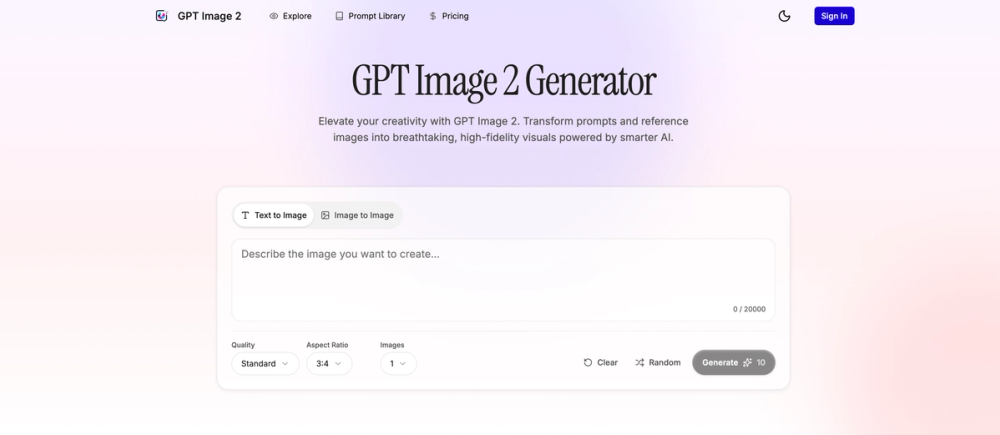
- Prompt controls with a visible 20,000-character prompt field, quality selection, aspect ratio options, image count controls, clear/random actions, and downloadable results.
- Support for several visual directions, including realistic photography, editorial illustration, cinematic concept art, clean product renders, social graphics, and experimental compositions.
- In-image text support for short visual copy such as poster headlines, product labels, signs, stickers, menu items, and campaign callouts.
- A prompt inspiration area that lets visitors explore hand-picked image ideas and send prompts directly to the generator.
Use Cases
GPT Imagine is most naturally useful when a team needs to move from a rough idea to several visual directions quickly. The public page highlights poster ideas, ad concepts, launch visuals, thumbnails, social images, app-store graphics, presentation visuals, ecommerce-style scenes, and product concepts. That makes it relevant for early creative exploration, especially when the final direction is not yet fixed.
The tool also appears useful for visual briefs with multiple constraints. The site encourages prompts that describe subject, background, style, mood, framing, lighting, product details, layout, ratio, and other constraints. That kind of structure matters for marketers and designers who need more than a generic image: they may need a product scene with a specific material feel, a campaign visual with short readable text, or a hero image that works in a particular canvas shape.
For reference-based work, GPT Imagine can help users keep a source image in the creative loop while requesting changes through natural language. This is useful for controlled variation, product-scene exploration, and design iteration, although users should verify how consistently the output preserves important product details, character identity, brand elements, and text accuracy.
Pricing
GPT Imagine has a public pricing page built around credits for GPT Image 2 generation. The visible annual plans include Basic Annual at $6.99 per month billed annually at $83.88, with 24,000 credits valid for 12 months and up to 2,400 images; Pro Annual at $23.99 per month billed annually at $287.88, with 102,000 credits valid for 12 months and up to 10,200 images; and Studio Annual at $59.99 per month billed annually at $719.88, with 312,000 credits valid for 12 months and up to 31,200 images. The page also references one-time, monthly, and yearly billing controls, so buyers should confirm the currently selected billing period, credit rules, and image cost before subscribing.
User Experience and Support
The GPT Imagine homepage presents a direct generator interface rather than a dense creative suite. Visitors can choose text-to-image or image-to-image, enter a detailed prompt, select quality and aspect ratio, set image count, generate, clear the prompt, randomize ideas, and browse inspiration. That layout suggests the product is trying to keep the workflow approachable for people who want a fast path from creative brief to usable visual.
Support information is less prominent in the fetched public evidence than generation and pricing details. The site includes detailed FAQ-style guidance about prompt format, quality settings, aspect ratios, credit calculation, improving results, product and ecommerce images, marketing and social media, and what to do when generation fails or looks wrong. Readers who need account support, refund terms, commercial usage terms, or team-level service expectations should verify those details directly before purchase.
Technical Details
GPT Imagine is presented as a GPT Image 2 generator with text-to-image and image-to-image modes. The visible controls include prompts, reference images, quality levels, aspect ratios, image count, downloadable outputs, and credit-based usage. The site also highlights support for square, portrait, landscape, and larger visual formats, which is relevant when one idea needs to become a thumbnail, ad concept, poster draft, presentation image, or wide hero visual.
The public page does not expose deeper implementation details such as API access, model hosting, export formats beyond downloadable results, integrations, privacy controls, or team administration. For technical adoption, the most important verification points are likely output consistency, credit consumption by quality setting, reference-image behavior, commercial usage terms, and whether the workflow fits the user's existing design or marketing tools.
Pros and Cons
Pros
- Clear product identity: the site explains that GPT Imagine is an AI-powered image generation tool for GPT Image 2.
- Practical generation modes are visible, including text-to-image creation and reference-image editing.
- The page gives concrete creative use cases, from posters and product labels to thumbnails, ad concepts, product scenes, and ecommerce-style images.
- Pricing and credit quantities are visible, which helps users compare annual plans before signing up.
- The interface appears focused on a small set of creative controls rather than overwhelming users with complex parameter lists.
Cons
- Public support details are limited, so users should verify account help, billing support, and usage terms before depending on the tool.
- The site does not make integrations, API access, or team workflow features clear in the fetched evidence.
- Image quality, text accuracy, and reference-image consistency still need hands-on testing with the user's own prompts and assets.
- Credit usage can affect cost, so buyers should confirm how quality settings, image counts, and failed generations are charged.
FAQ
What is GPT Imagine used for?
GPT Imagine is used to create and edit AI images with GPT Image 2. The public site presents it as a generator for prompts, reference images, quality controls, aspect ratios, and downloadable results.
Who is GPT Imagine best suited for?
It appears best suited for creators, marketers, designers, product teams, and ecommerce users who need visual drafts, campaign images, product scenes, social graphics, thumbnails, posters, or presentation visuals. It is especially relevant when users can write clear creative briefs rather than relying on vague prompts.
Can GPT Imagine create images from both text and reference images?
Yes. The public generator shows both Text to Image and Image to Image modes. The site says users can write detailed prompts from scratch or upload a reference image and describe the change they want.
How does GPT Imagine handle text inside images?
The site highlights cleaner in-image text for posters, labels, signs, stickers, packaging notes, short callouts, and multilingual visual copy. Readers should still test important brand or campaign wording because AI-generated text can vary depending on prompt clarity, layout, and image complexity.
What pricing information is visible for GPT Imagine?
The pricing page shows credit-based annual plans for Basic, Pro, and Studio tiers, with credits delivered upfront and valid for 12 months. It also references one-time, monthly, and yearly billing controls, so users should confirm the active billing option and credit terms before subscribing.
Does GPT Imagine provide API or integration details?
API and integration details are not visible in the fetched public evidence. Teams that need automation, workflow integration, or developer access should verify those requirements directly with the product before adopting it.
What should users test before relying on GPT Imagine for production visuals?
Users should test prompt accuracy, image consistency, reference-image editing, in-image text quality, aspect ratio behavior, credit usage, and download quality. These checks matter because creative output can look promising in examples but still needs to match a specific brand, product, or campaign requirement.
Conclusion
GPT Imagine is a focused GPT Image 2 generator for people who want to turn prompts and reference images into practical visual assets. Its strongest public signals are clear generation modes, broad creative use cases, visible quality and aspect-ratio controls, and transparent annual credit plans. Before making it part of a production workflow, users should test it with their own prompts and verify support, licensing, integration, and credit-consumption details.