
Introduction
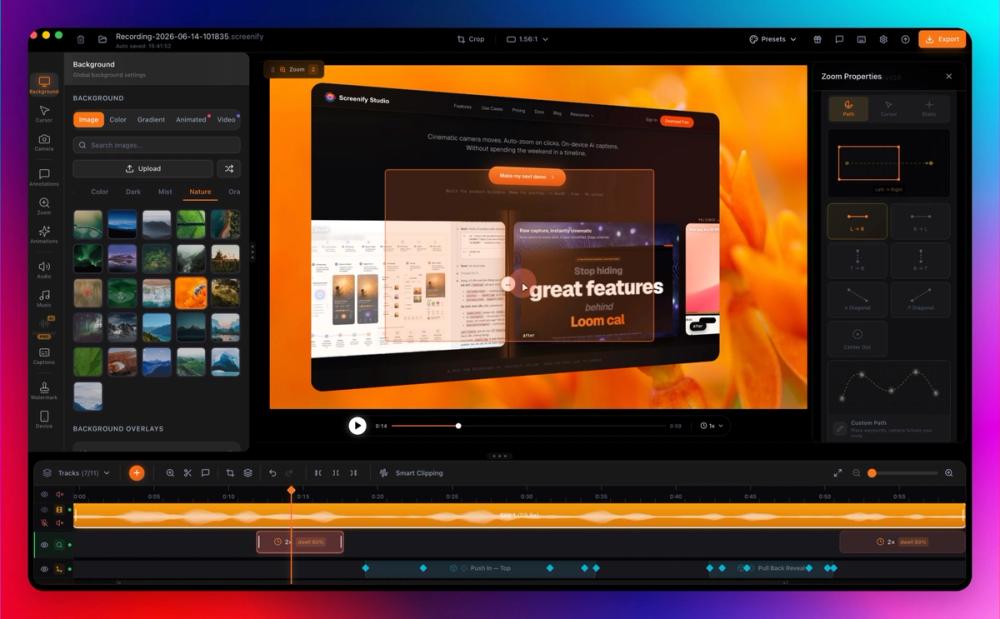
Screenify Studio is a macOS screen recorder aimed at indie hackers, app developers, and solo founders who want to turn raw screen captures into polished product demos without spending hours in a video editor. The tool applies cinematic 3D camera effects, smart auto-zoom on clicks, and on-device AI captions to raw recordings, all on the local machine with no cloud uploads required.
Built by a solo developer shipping in public from Ho Chi Minh City, the product positions itself against subscription-based competitors like Screen Studio, Loom, and Tella by offering a free tier with unlimited recording and a one-time lifetime purchase option. The recent addition of a command-line interface and AI agent integration means developers can also drive recordings and exports from the terminal or let an AI assistant handle the workflow programmatically.
Key Features
- 3D Cinematic Camera: More than 30 camera templates with multi-keyframe support, including dolly, pan-tilt, orbit, and crane movements. Three camera modes and unlimited keyframes allow custom cinematic compositions on screen recordings.
- Camera Route Design: Define custom camera paths with Bezier curves and timeline keyframes for precise pan and zoom routing across a recording.
- Smart Auto-Zoom: AI detects clicks, typing, and mouse dwell time to automatically zoom into relevant areas. Twenty-four callout bubble styles and three trigger types are available.
- AI Background Removal: Neural Engine-powered real-time background removal for the camera feed, processing at 5-20ms per frame. Supports blur, solid color, or custom image replacement without cloud processing.
- AI Captions and Subtitles: Whisper-powered word-level karaoke sync with reported 98%+ accuracy. Subtitles are generated and synced locally with style customization options.
- Metal GPU Export: Hardware-accelerated export on Apple Silicon using Metal GPU, claimed to be 3x faster than Electron-based competitors. Supports 4K native export at 60fps with HDR.
- Command Line and AI Agents: A
screenifyCLI allows headless recording and export. AI agents like Claude can drive Screenify through a JSON-speaking interface for automated demo generation. - Callout Effects: Eight animated highlight styles combining zoom, dim, border glow, and 3D depth effects in a single segment, with four shape options.
- Six Camera Layouts: Picture-in-Picture, Side-by-Side, Focused, Screen-Only, Camera-Only, and Custom layouts with morph transitions and per-region easing.
- Camera Replacement: Import any video as your camera feed, with 3D camera tracking and background removal support.
Use Cases
- Product Launch Demos: Create polished feature demos for Product Hunt, X (Twitter), or App Store submissions. The site shows a Monday scenario where a feature demo with 3D camera and auto-zoom takes about 15 minutes.
- Build-in-Public Content: Record daily clips for social media with camera picture-in-picture and cinematic transitions, aimed at completing a post-ready clip within a lunch break.
- Bug Fix Walkthroughs: Capture window-level recordings with callout glows and keystroke visualization for technical documentation or team communication.
- App Store Videos: The tool includes one-click App Store spec export at 15-30 seconds and 30fps, including 3D device frames that track the camera.
- AI-Driven Web App Demos: Point the CLI at a URL and let the AI agent click through a web application, generating a cinematic demo in a single pass. The documentation notes this can work behind login screens.
- Voice Cloning and Localization: Generate zero-shot voice clones from a 3-second sample and produce text-to-speech in 30+ languages for localized demo narration.
Pricing
Screenify Studio offers three pricing tiers:
- Free: Unlimited recording with no time limit, unlimited local export at 1080p with a watermark, 3D effects, callout effects, and the full editing suite. Includes 3 shareable links with 7-day expiry.
- Pro ($89/year): 4K export without watermark, on-device AI background removal, AI captions with word-level karaoke, AI translation in 50+ languages, unlimited shareable links, and support for 3 devices with priority support.
- Lifetime ($149 one-time): Everything in Pro plus lifetime updates with no renewal required.
The site compares this pricing model against Screen Studio, Loom, and Tella, which it characterizes as $9-29/month subscription-only services with no free tier.
User Experience and Support
Screenify Studio is currently available for macOS (13 Ventura or later, Apple Silicon or Intel), with Windows and Linux listed as coming soon. The application is described as an 80MB native Mac app with no Chromium dependency.
Support includes a documentation site with a getting-started guide, system requirements, feature reference, and a command-line guide. The site also maintains a blog with recording guides and alternative comparisons. Pro and Lifetime customers receive priority support, though specific response times are not stated.
The product has a changelog and an affiliate program, suggesting active development and community growth.
Technical Details
Screenify Studio is built as a native macOS application leveraging Apple Silicon's Neural Engine, Metal GPU, and Core ML for on-device AI processing. The app weighs approximately 80MB and avoids Electron or Chromium frameworks, which the developer cites as a performance advantage.
All AI processing - background removal, caption generation via Whisper, and voice cloning - runs locally on the device. The tool supports 4K native export at 60fps with HDR, and the Metal GPU pipeline is claimed to deliver 3x faster exports compared to Electron-based alternatives.
The command-line interface uses a JSON-speaking command structure, making it compatible with CI pipelines and AI agent integrations. The documentation specifically mentions compatibility with Claude Code as an AI agent that can drive Screenify through plain-language instructions.
Pros and Cons
Pros
- Free tier with unlimited recording and no watermark-free export constraint at 1080p
- On-device AI processing means no cloud uploads and offline functionality
- Native Apple Silicon app avoids Electron overhead for faster exports
- Lifetime purchase option at $149 eliminates recurring subscription costs
- CLI and AI agent integration opens automated workflow possibilities
Cons
- macOS only; Windows and Linux support are listed as coming soon but not yet available
- Free tier exports include a watermark, which may be a dealbreaker for public-facing content
- Pro plan at $89/year is a recurring cost that partially offsets the lifetime comparison
- The product is early-stage with a small number of publicly visible early adopters
- Some feature claims such as export speed comparisons rely on self-reported benchmarks
FAQ
What are the system requirements for Screenify Studio? Screenify Studio requires macOS 13 Ventura or later and runs on both Apple Silicon and Intel Macs. Windows and Linux support are listed as coming soon. The app is approximately 80MB and does not require Chromium or Electron.
How does the AI caption feature work? AI captions use Whisper for speech recognition with word-level karaoke synchronization, reported at 98%+ accuracy. All processing happens locally on your Mac using Core ML, so no audio is uploaded to any cloud service.
Can I use Screenify Studio to record web app demos automatically?
Yes. The command-line interface lets you point screenify at any URL, and an AI agent will navigate and click through the application to produce a cinematic demo. The documentation notes this can work behind login walls, and output supports GIF, MOV, and MP4 formats.
What is the difference between the Free and Pro plans? The Free plan includes unlimited recording, 1080p local export with a watermark, 3D effects, and 3 shareable links. Pro ($89/year) adds 4K watermark-free export, AI background removal, AI captions, AI translation in 50+ languages, unlimited shareable links, and priority support for up to 3 devices.
Is there a lifetime purchase option? Yes. The Lifetime plan costs $149 as a one-time payment and includes everything in Pro plus lifetime updates with no renewal. This positions Screenify against subscription-only competitors.
Does the tool work offline? Yes. Since all AI processing runs locally on your Mac using the Neural Engine and Metal GPU, Screenify Studio functions fully offline once installed. No internet connection is required for recording, editing, or exporting.
Conclusion
Screenify Studio addresses a specific pain point for product builders: the gap between a raw screen capture and a polished demo video. By combining 3D cinematic camera effects, on-device AI captioning, and smart auto-zoom into a single native Mac application, it aims to reduce what the developer calls the "editing tax" - the time spent making a recording look presentable rather than building.
The free tier makes it easy to evaluate, and the lifetime purchase option appeals to developers wary of yet another monthly subscription. The CLI and AI agent integration are notable differentiators for technical users who want to automate demo generation. As with any early-stage tool, prospective users should verify the export quality and workflow fit for their specific needs, and keep an eye on the Windows and Linux roadmap if cross-platform support matters.