
Introduction
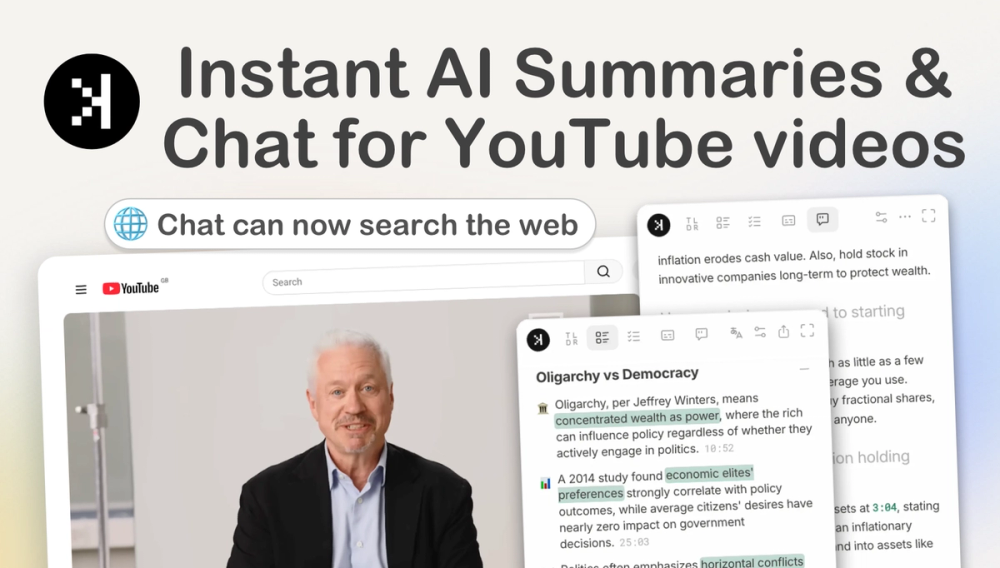
SkipBait is a Chrome extension built for the YouTube watch page: it adds a side panel for AI summaries, transcript tools, and chat that can pull in live web search when questions go beyond the video. The product positions itself around retention-skim an honest title and TL;DR, jump via timestamped outlines, export notes as PDF or text, and ask follow-ups without copying captions into another app. It is YouTube-only and installs from the Chrome Web Store; it is not a paste-a-URL web summarizer. Learners, podcast listeners, and anyone drowning in long-form video may find it useful if they already use Chromium browsers.
Key Features
Summary bundle on the watch page. One click on "get full summary bundle" produces an honest title (alongside the original), a short TL;DR, a timestamped section outline, and actionable to-dos grounded in what the speaker said. You can open chat without generating a bundle first.
AI chat with web search. The chat with YouTube videos flow runs in a panel next to the player. Replies can link to moments in the video; when a question is outside the transcript, SkipBait describes searching the web and surfacing sources for review.
Transcript tools. The extension supports viewing, searching, and splitting speakers on captions where YouTube provides usable transcript data. Transcript retrieval is advertised as unlimited on the free tier. A separate on-site transcript downloader exists for copy/download without the extension.
Export and notes. After a summary is generated, the same panel can export a bundle as PDF, plain text, or copy-paste-described on the site as YouTube to PDF and notes, including TL;DR, titles, timestamped summary, and actionables rather than raw caption dumps only.
Language support. Chat is described as supporting 50+ languages while staying grounded in the video. Summary bundles can be translated to French, German, Spanish, Hindi, Simplified and Traditional Chinese, and Korean. Transcripts follow YouTube's available caption languages; the site states SkipBait does not translate transcripts separately.
Panel UX. The panel loads automatically on watch pages; it can expand for longer reads or deeper chat threads. Formatting options such as highlight size and bullets are tied to installing the extension.
Use Cases
Students and self-learners can skim lecture or tutorial structure, then jump to the timestamp where a concept is explained instead of scrubbing manually. Professionals reviewing interviews or podcasts can use honest titles and outlines to decide whether a two-hour video is worth full attention.
Researchers and curious viewers can ask about claims or speaker background and rely on web-backed answers when the transcript alone is insufficient-still worth verifying citations yourself for anything high-stakes.
Note-takers can turn a watch session into shareable PDF or TXT study notes from the summary bundle. Multilingual viewers can chat in a preferred language or translate summary output where those languages are listed on the product site.
Pricing
SkipBait is free to install with a documented free tier: 2 AI summary bundles per day (daily reset), unlimited transcript retrieval, and limited AI chat messages plus limited summary translation that reset monthly (the public copy cites 15 chat messages and 1 translated summary per month on free; confirm current numbers in the extension or account UI before budgeting).
Paid tiers described in queue evidence include plans with unlimited summary analyses plus 300 or 600 AI chat messages per month, respectively. Exact plan names, prices, and billing links should be checked on skipbait.app at purchase time-this profile does not reproduce live checkout amounts.
YouTube-to-PDF and export options are referenced as available on the free tier in Chrome; heavy summary or chat use will hit the stated caps.
User Experience and Support
Onboarding is extension-first: install from the Chrome Web Store, open any YouTube video, and use the side panel. The site publishes step-by-step guides for summarizing with AI and compares manual ChatGPT transcript workflows versus on-page extensions.
FAQ-style help on the marketing site covers bundle contents, browser support (Chromium family: Chrome, Brave, Edge, Arc, Opera, Vivaldi-not Firefox or Safari), videos without transcripts, and content types (podcasts, news, lectures, tutorials). For billing or quota questions, use whatever contact or account paths the extension exposes after install; this article does not list a dedicated support desk email from the fetched pages.
Technical Details
SkipBait is a YouTube-only Chrome extension with a watch-page side panel. It requires a Chromium browser that can install Chrome Web Store extensions. Summaries and chat depend on usable YouTube transcript/caption data; live streams or videos without captions may not work as advertised.
Core capabilities run in the browser context on youtube.com-no separate upload step for the video summarizer flow described on the site. AI features imply server-side processing for summaries and chat even though interaction stays on the watch page; privacy-conscious users should read SkipBait's policies in the store listing and on the official site.
Integration surface is effectively Chrome / Chromium + YouTube; there is no standalone mobile app or desktop client described in the fetched evidence.
Pros and Cons
Pros
- Stays on the YouTube watch page-no transcript copy-paste into external chat tools for the main bundle flow.
- Rich summary bundle: honest title, TL;DR, timestamps, and actionables in one action.
- Unlimited transcript retrieval on the free tier is a strong differentiator for caption-heavy workflows.
- Chat can extend beyond the video with web search and visible sources, plus timestamp jumps when answers cite the video.
- Export to PDF/TXT supports study and archival workflows from the same panel.
Cons
- YouTube-only; no support for other video platforms in the public product description.
- Firefox and Safari users are out of scope per site FAQ.
- Free tier caps on summary bundles and monthly chat/translation limits may frustrate daily power users.
- Quality still depends on caption availability and AI accuracy-long or niche videos may need manual verification.
- Not a replacement for clinical, legal, or medical interpretation of video content.
FAQ
What is SkipBait in one sentence?
SkipBait is a Chrome extension that adds AI summaries, transcripts, chat, and export tools to the YouTube watch page, with optional web search during chat.
How is SkipBait different from pasting a transcript into ChatGPT?
The site emphasizes running on the watch page: one-click summary bundles, built-in chat, and timestamp links without manually copying captions or chaining prompts. Manual alternatives are discussed in SkipBait's own comparison content for users who prefer that workflow.
What's included in a summary bundle?
An honest title, TL;DR, timestamped outline, and actionable to-dos. Chat can be used without generating a bundle first.
Is there a free plan?
Yes. Public copy describes 2 AI summary bundles per day, unlimited transcript retrieval, and monthly limits on chat messages and summary translation on the free tier. Paid plans raise summary and chat allowances.
Can SkipBait work on browsers other than Chrome?
It targets Chromium-based browsers that support Chrome Web Store extensions (Chrome, Brave, Edge, Arc, Opera, Vivaldi). Firefox and Safari are not supported according to the site FAQ.
Does SkipBait summarize any YouTube video?
It requires usable transcript data from YouTube. Live or captionless videos may not be supported. The product pages describe use across podcasts, news, lectures, and tutorials when captions exist.
Can I export notes or PDFs from a video?
After generating a summary, the panel can export PDF, TXT, or copy content that includes the bundle fields-not only raw transcript text.
Conclusion
SkipBait fits Chromium users who live on YouTube and want faster orientation: skim structure, verify claims with chat, grab transcripts, and save notes without leaving the player. The free tier is enough to try summaries and unlimited transcript access, while heavy chat or daily summary volume likely needs a paid plan. Before relying on it for research or study, confirm caption coverage on your videos and current quota limits in the extension. Install from the Chrome Web Store via skipbait.app and test on a familiar long video to see whether honest titles and timestamped outlines match how you actually watch.