
Introduction
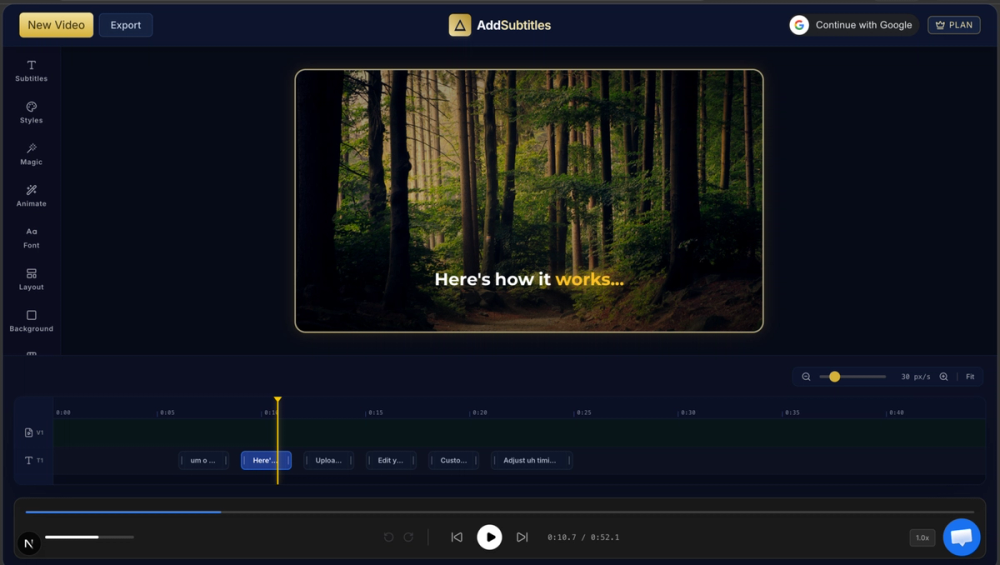
AddSubtitles is a browser-based AI video editor focused on automatically generating subtitles, removing silences, filtering filler words, and applying animated typography effects. Built for short-form content creators working on TikTok, YouTube Shorts, and Instagram Reels, the tool combines subtitle generation with several editorial cleanup features - silence removal, filler word filtering, and word-by-word animation presets - in a single web interface. For creators who spend too much time scrubbing timelines and re-exporting minor tweaks, the pitch is straightforward: AI handles the tedious parts while you focus on content.
Key Features
- Automatic Subtitle Generation - Upload a video and the tool generates subtitles automatically. The site claims no watermarks on output and supports translation to 150+ languages. Subtitle styles range from static text to animated presets.
- Silence and Dead Air Removal - AI analyzes the audio waveform, flags pauses, and removes them in one toggle. The site claims this can reduce video length by roughly 30%, which is a meaningful time savings for podcast-style or talking-head content.
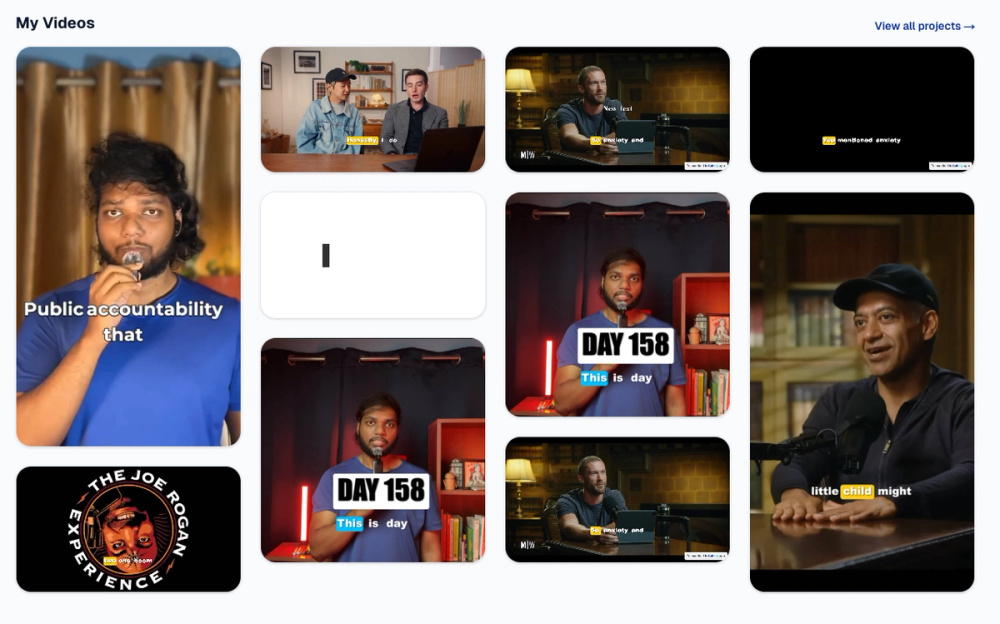
- Filler Word Filtering - Automatically identifies and strikes through "um," "uh," "like," and other hesitations in the transcript. The filler words remain visually tagged but are highlighted rather than cut, giving editors control over what stays.
- Viral Typography and Word Animations - A library of animation presets including Stomp, Wave, Flip, Karaoke, and Pop, designed to match the kinetic subtitle style popular on short-form platforms. The site positions these as CapCut-level animations accessible through a browser interface.
- Saveable Style Presets - Once you settle on a font, animation, and color scheme, you can lock it as a preset and apply it to future videos. This aims to reduce the repetitive "tweak font, re-export, check" cycle the site describes as a common pain point.
- 9:16 Export - Direct export in vertical format optimized for TikTok, Shorts, and Reels, with 1080p and 4K options available on paid plans.
Use Cases
For short-form content creators who produce multiple videos per week, the combination of auto-subtitles and silence removal addresses the two most time-consuming post-production steps. The site claims 1,000+ daily creators, suggesting the tool is positioned for high-volume output rather than occasional use.
For podcasters and interview-format creators, the silence removal and filler word filtering can tighten raw recordings without manual editing. The visual tagging of filler words lets creators decide case-by-case whether to keep or cut each instance.
For creators who work across multiple languages, the 150+ language translation support for subtitles opens up multilingual distribution without requiring separate transcription services. This is particularly relevant for creators targeting international audiences on platforms like TikTok.
Pricing
The site displays a freemium model. The free tier includes watermarked 720p exports, auto subtitles for videos up to 1 minute, and standard subtitle styles. Paid plans unlock no-watermark exports, 1080p and 4K resolution, auto subtitles for videos up to 60 minutes, premium dynamic animations, and translation to 150+ languages. The exact paid plan pricing is not fully visible on the fetched homepage - the site invites users to "try it free" with no credit card required. Readers should check the pricing page for current plan details.
User Experience and Support
The workflow is web-based with no software installation required. The site emphasizes speed - "add subtitles in seconds" - and positions the tool as an alternative to desktop editors like CapCut. The interface appears to follow a linear upload-edit-export flow. Support details beyond the homepage are not prominently featured in the fetched evidence. An affiliate program and login page are visible, suggesting some level of account-based feature gating.
Technical Details
AddSubtitles operates entirely in the browser. The AI processing for subtitle generation, silence detection, and filler word filtering happens server-side after upload. The site does not disclose the underlying speech-to-text model, processing infrastructure, or file size limits. Export supports 9:16 vertical format with 1080p and 4K options on paid tiers. The free tier is limited to 720p with watermarks.
Pros and Cons
Pros
- Free tier allows genuine evaluation with no credit card required
- Combines subtitles, silence removal, and filler word filtering in one tool rather than requiring separate services
- Animated typography presets match the visual style popular on short-form platforms
- Saveable presets reduce repetitive setup for recurring content formats
- 150+ language translation support for multilingual content distribution
Cons
- Free tier limited to 1-minute videos and watermarked 720p output, which restricts serious evaluation
- Exact paid plan pricing not visible on the homepage - requires navigating to the pricing page
- Server-side AI processing means videos must be uploaded, which may concern creators with unreleased content
- No visible API access or integration with editing software like Premiere or DaVinci Resolve
- Support channels and response times are not documented on the public pages
FAQ
What is AddSubtitles?
AddSubtitles is a browser-based AI video editor that automatically generates subtitles, removes silences, filters filler words, and applies animated typography effects. It is designed for short-form content creators working on TikTok, YouTube Shorts, and Instagram Reels.
Is there a free plan?
Yes. The free tier includes watermarked 720p exports, auto subtitles for videos up to 1 minute, and standard subtitle styles. No credit card is required to start.
How does the silence removal work?
AI analyzes your video's audio waveform, identifies pauses and dead air, and removes them with one toggle. The site claims this can reduce video length by approximately 30%, though actual results depend on the source content.
Can I use it for multilingual content?
Yes. Paid plans include subtitle translation to 150+ languages, allowing you to generate subtitles in languages beyond the original audio without separate transcription services.
What animation styles are available?
The tool offers presets including Stomp, Wave, Flip, Karaoke, and Pop, described as matching the kinetic subtitle style popular on short-form platforms. These are available on paid plans as premium dynamic animations.
Does the free plan have watermarks?
Yes. Free tier exports include watermarks and are limited to 720p resolution. Paid plans remove watermarks and unlock 1080p and 4K export.
Conclusion
AddSubtitles addresses a real pain point for short-form creators: the time-consuming process of adding subtitles, cutting dead air, and polishing talking-head content. The browser-based approach removes the need for desktop editing software, and the combination of subtitle generation with silence removal and filler word filtering in one tool is practical. The free tier provides a reasonable starting point for evaluation, though creators should verify the paid plan pricing and processing limits before committing to regular use.