
Introduction
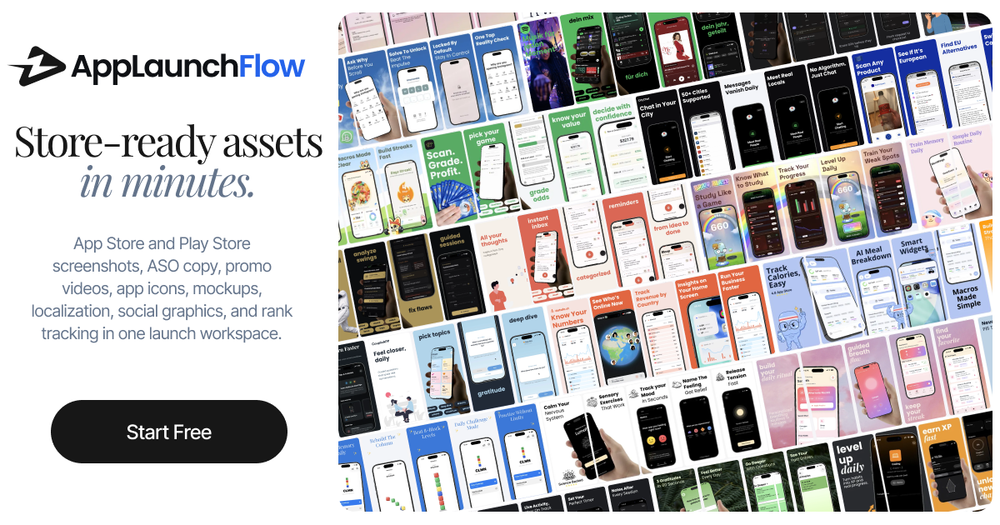
AppLaunchFlow is an all-in-one launch asset workspace for iOS and Android developers. It generates App Store and Google Play screenshots, ASO copy, promo videos, app icons, mockups, localization, social graphics, and keyword tracking from a single interface. The core promise is straightforward: upload raw screenshots, let AI handle the heavy lifting, and export store-ready assets in minutes.
For indie developers and small teams without a dedicated design resource, AppLaunchFlow fills the gap between raw app screenshots and polished, guideline-compliant store listings. The platform has been used by over 3,700 app developers.
Key Features
Screenshot Editor
The central tool. Upload raw screenshots from your phone, and AppLaunchFlow generates App Store-compliant layouts with AI-generated copy, 3D device frames, and proven template styles. The visual editor supports drag-and-drop editing with undo, redo, and auto-save. Over 20 premium styles are available based on competitor analysis of top-performing apps.
Promo Video Generator
Upload screenshots and let AI build a complete video storyboard with scenes, transitions, and copy. The tool supports cinematic motion with 3D device frames and exports for App Store, Google Play, TikTok, Instagram Reels, and YouTube in MP4 or WebM.
ASO Copy Generator
Generates promotional text, short descriptions, and full descriptions tuned for discoverability and downloads. The AI analyzes up to 5 competitor apps and explains why each line works, providing per-field insights alongside the generated copy.
App Icon Composer
Describe your app or upload a logo, generate AI icon concepts, then refine them in a layered editor with groups, layers, backgrounds, and gradients. Export pixel-perfect iOS and Android icons with Default, Dark, and Tinted appearances.
Localization
Translate screenshots and store copy into 25+ App Store languages with one click. Layouts adapt automatically for longer text in different languages.
Social Graphics
Create LinkedIn banners, X headers, OG images, and social posts from the same editor used for App Store visuals. Platform presets are sized and ready for each format.
Keyword Monitor
Track App Store keyword rankings daily per country with position, 7- and 30-day deltas, and sparkline trends. Smart discovery auto-detects what your app already ranks for.
Store Connections
Connect App Store Connect and Google Play Console to reply to reviews, run A/B tests for screenshot variants, and publish ASO copy and screenshots directly.
MCP Integration
Connect AppLaunchFlow to AI coding assistants like Claude Code, Cursor, or Codex via MCP. Design screenshots from your terminal without leaving your development workflow.
Use Cases
App Store Launch Preparation
The primary use case. Indie developers preparing for a launch can generate all store assets - screenshots, copy, icons, and videos - from a single workspace rather than coordinating across multiple tools.
Ongoing ASO Optimization
For apps already live, the keyword monitor and A/B testing features support continuous optimization. The store connections enable direct publishing of updated screenshots and copy.
Multi-Market Expansion
The localization feature lets developers translate store assets into 25+ languages with automatic layout adaptation, making multi-market expansion practical for teams without dedicated localization resources.
Social Media Promotion
The social graphics tool creates platform-specific assets from the same visual identity used for store listings, maintaining consistency across marketing channels.
Pricing
AppLaunchFlow uses a three-tier model. The Free tier includes one completed project with preview-only exports, one AI illustration per month, and no credit card required. A one-time payment option provides 7 days of full access. Monthly and annual subscription tiers offer unlimited projects and exports, with the annual plan saving 45%.
The free tier is designed for exploration - you can generate and edit every asset type, but downloads are locked until you upgrade.
User Experience and Support
The interface is organized around asset types: Screenshots, Social Graphics, Promo Video, Mockups, Icons, ASO Copy, and Keywords. Each tool follows a consistent three-step flow: upload, edit with AI assistance, then export.
The about page introduces the founder, Yannick, and the contact page offers direct email and X (Twitter) communication.
Technical Details
AppLaunchFlow is a web-based platform that handles screenshot processing, AI generation, video rendering, and store API integrations. The MCP server is available via npm (@applaunchflow/mcp) and supports Claude Code, Cursor, and Codex.
The platform connects directly to App Store Connect and Google Play Console for publishing, review management, and A/B testing. Export formats include all required App Store and Play Store screenshot sizes.
Pros and Cons
Pros:
- All-in-one workspace for screenshots, video, copy, icons, and keywords
- AI-generated layouts and copy with competitor analysis
- Direct store connections for publishing and A/B testing
- Localization into 25+ languages
- MCP integration for developer workflow continuity
- Free tier available without credit card
- Over 3,700 developers have used the platform
Cons:
- Free tier exports are preview-only until upgraded
- Video generation capabilities not fully detailed in evidence
- No mention of team collaboration or multi-user features
- Platform appears focused on mobile apps only
FAQ
What does AppLaunchFlow do?
It generates all the visual and text assets needed for an App Store or Google Play listing: screenshots, ASO copy, promo videos, app icons, mockups, social graphics, and keyword tracking. Everything is created and edited in one workspace.
Is there a free tier?
Yes. The free tier includes one completed project with preview-only exports, one AI illustration per month, and access to the full editing workflow. Downloads are locked until you upgrade.
Can I publish directly to the stores?
Yes. AppLaunchFlow connects to both App Store Connect and Google Play Console. You can publish ASO copy, keywords, and screenshots directly, run A/B tests, and reply to reviews without leaving the platform.
Does it support localization?
Yes. Translate screenshots and store copy into 25+ App Store languages with one click. Layouts adapt automatically for longer text.
Can I use it from my terminal?
Yes. The MCP server integration lets you design screenshots from Claude Code, Cursor, or Codex without leaving your development workflow.
Conclusion
AppLaunchFlow addresses a real pain point for mobile developers: the scattered, time-consuming process of preparing store assets across multiple tools. By consolidating screenshots, copy, video, icons, localization, and keyword tracking into a single workspace with AI assistance, it reduces launch preparation overhead significantly. The free tier lets you evaluate the full workflow before committing, and the direct store connections eliminate the manual upload cycle. For indie developers and small teams without dedicated design resources, this is a practical alternative to coordinating across Figma, Canva, copywriting tools, and manual store uploads.