
Introduction
Cursive Generators hosts a free cursive text maker that pairs Unicode copy-paste styles with real-font previews you can export as PNG or SVG. Type a name, quote, or short phrase once, compare decorative text for social bios against downloadable handwriting images for signatures or print, and pick the output that fits-without creating an account or paying on the main generator. The site also branches into letter guides, signature and tattoo helpers, worksheets, and blog content on handwriting and design topics.
Key Features
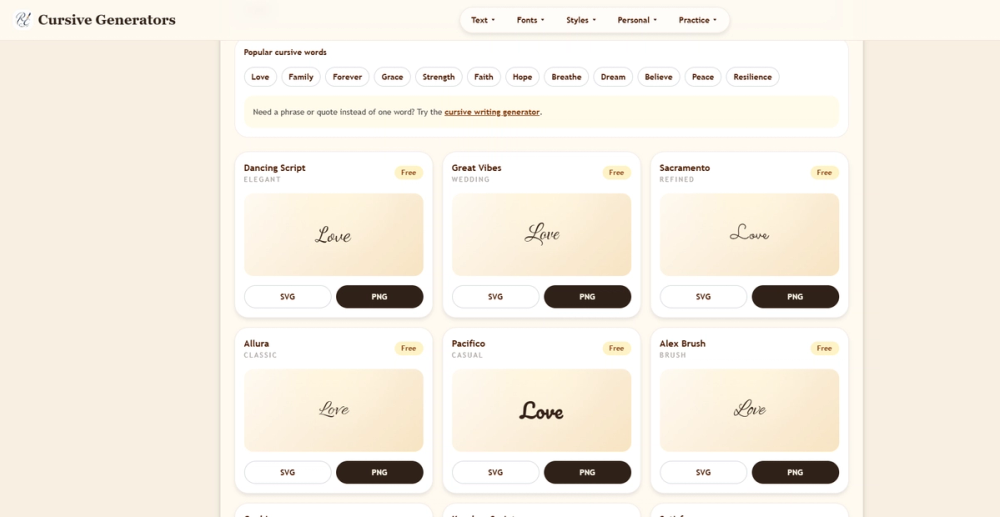
The core Cursive Generator updates previews live as you type. You can work in two modes: Copy & Paste Unicode cursive (the public page cites 35 styles, including script, bold script, italic, small caps, fullwidth, and decorative variants) or Real Fonts with roughly 36 preview cards spanning elegant, wedding, casual, notebook, marker, bold, calligraphy, and handwriting looks.
PNG and SVG export applies to real-font cards. SVG scales cleanly for logos and slides; PNG suits transparent signatures, email footers, Canva, and quick shares. Unicode output stays plain text for one-tap copy into Instagram, TikTok, Discord, or captions.
The navigation groups related tools-text converters, font images, letter and number generators, signature and tattoo name pages, note and logo generators, stencil and typing animation, alphabet charts, writing practice, and Cyrillic options-so users can move from a quick bio tweak to a more specific asset without hunting elsewhere.
On-page copy explains why Unicode and image exports behave differently: pasted characters depend on each app's fonts, while downloaded files preserve the chosen style. Style grids let you scan options side by side before copying or exporting.
Use Cases
Social and messaging: Unicode mode fits bios, display names, and short decorative lines where speed matters more than pixel-perfect consistency.
Signatures and professional touchpoints: Real-font PNG exports support email signatures, PDF letterheads, and documents where a stable visual matters.
Tattoos and personal design: High-contrast script previews can serve as references; SVG helps designers who need scalable artwork.
Events and classrooms: Wedding invitation wording, classroom labels, quote graphics, and printable worksheets align with the site's linked practice and alphabet resources.
Brand and mockups: Logo and stencil generators on the same domain extend the main generator for lightweight branding experiments.
Match output to intent: copy for social text, PNG for transparency in docs, SVG when you need to resize without blur.
Pricing
Public messaging positions the main cursive generator as free: no login, credits, or payment required to type, preview, copy Unicode, or download PNG/SVG from the real-font cards described on the homepage. The site does not surface paid tiers or subscriptions in the fetched evidence-if premium tools exist on deeper pages, check those URLs directly before assuming limits.
User Experience and Support
First visits stay lightweight: a single input, dual output paths, and immediate previews. Mobile layouts stack style cards so phone users can copy one Unicode style quickly.
Self-service help comes through the blog and guides-handwriting tutorials, cursive versus italic versus script comparisons, signature how-tos, tattoo and wedding font tips, policy-style articles, and alphabet charts. Single-letter cursive guides are published for some letters, with others listed as part of a visible roadmap.
There is no live chat or ticket system called out on the fetched homepage; support expectations should lean on on-site documentation and tool-specific pages linked from the main nav.
Technical Details
Real-font downloads are generated in the browser according to public copy-no account gate on the core flow. Unicode conversion maps standard letters to existing Unicode characters; compatibility varies by OS, app, and accessibility tools (screen readers may not treat decorative Unicode like ordinary text).
The property runs as a web app at cursivegenerators.org with multiple path-based tools (signatures, tattoos, letters, languages, etc.). Integration is manual: copy/paste into social apps or import PNG/SVG into design tools such as slides or Canva as described on the site-not an API product in the evidence shown.
Pros and Cons
Pros
- Free core generator with both Unicode and real-font paths in one place.
- Large style variety (35+ Unicode variants and 36 font previews cited on the page).
- PNG and SVG exports for consistent visuals across devices.
- No sign-up required for the main workflow described publicly.
- Extensive satellite tools and educational content for cursive and design topics.
- Clear on-page explanation of Unicode versus downloadable image tradeoffs.
Cons
- Unicode output can render as boxes or fallback fonts in some apps or older systems.
- Only the homepage was verified in this profile; deeper tool pages may have different limits or behavior.
- No documented enterprise API or team features in the available evidence.
- Letter-by-letter guides are incomplete per the site's own roadmap note.
- Heavy reliance on browser-side generation may matter for users on restricted networks or older browsers-verify locally if exports fail.
FAQ
What is Cursive Generators?
It is a free online cursive text maker at cursivegenerators.org that lets you generate decorative Unicode text for copy-paste or download real-font cursive as PNG and SVG, plus related tools for signatures, tattoos, letters, and practice content.
Do I need an account to use the cursive generator?
The public homepage states the tool works without login, credits, or payment for creating and downloading results from the main generator flow.
When should I use Unicode copy-paste versus PNG or SVG?
Use Unicode for quick social bios and short messages where text paste is enough. Use PNG or SVG when you need the same look in emails, PDFs, tattoos references, invitations, or design tools regardless of device fonts.
Is Cursive Generators really free?
Fetched pricing signals describe the core generator as free with no payment required; confirm any specific sub-tool page if you use advanced generators beyond the main cursive maker.
Can I use the output for commercial projects?
The fetched evidence does not spell out licensing for fonts or exports. Read terms, privacy, and any font notices on the official site before using downloads in client or commercial work.
Why does my pasted cursive look different on my phone?
Unicode decorative characters depend on each platform's fonts. That is why the site recommends image export when visual consistency matters.
Does the site help with learning to write cursive by hand?
Yes-the blog and linked sections cover how to write cursive, capital letters, alphabet charts, D'Nealian versus Zaner-Bloser comparisons, and related classroom topics, separate from the digital generator.
Are there tools besides the main generator?
The navigation lists text converters, font images, signature and tattoo name tools, note and logo generators, worksheets, typing animation, and language variants such as Russian Cyrillic on the same domain.
Conclusion
Cursive Generators fits anyone who needs fast cursive styling without installing desktop fonts-social users benefit from Unicode copy, while signatures, invitations, and design drafts gain reliability from PNG and SVG. Treat Unicode as convenient but device-dependent, and lean on real-font exports when the look must stay fixed. Explore the main generator and linked specialty pages to match output type to your use case, and verify licensing and any future paid features on the official site if your project goes beyond casual personal use.