
Introduction
JavaScript Tools on JSTools.Space is a free online hub of browser-based developer utilities for formatting structured data, encoding and decoding Base64, inspecting tokens, hashing text, and generating placeholder content. The site describes itself as privacy-first: utilities run in the browser with input intended to stay on your device. Developers who need quick one-off tasks without installing CLI tools or creating accounts may find it a convenient bookmark-though anyone handling secrets should still follow the docs' warning not to treat generated examples as production credentials after sharing them publicly.
Key Features
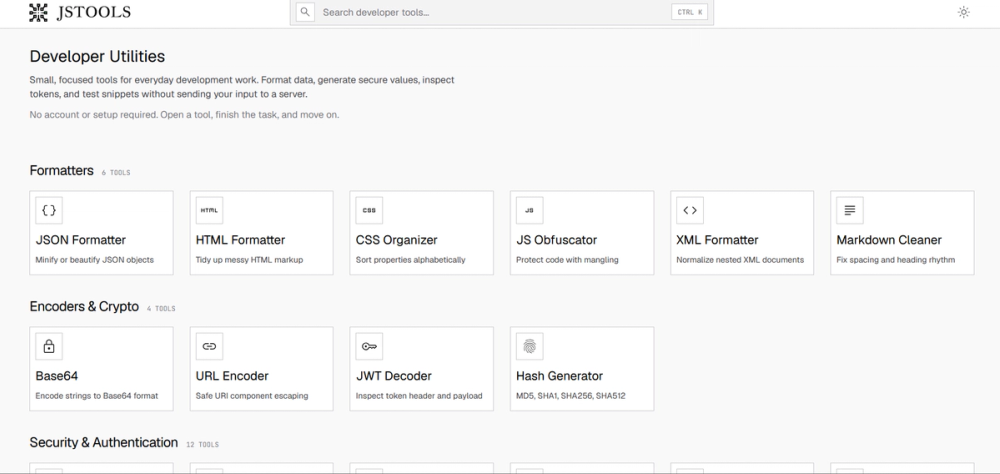
- Formatters: JSON minify/beautify, HTML tidy, CSS organizer and minifier, JS obfuscator, XML formatter, Markdown cleaner, and Markdown-to-Word export
- Encoders & crypto: URL encoder, JWT decoder, hash generator (MD5, SHA1, SHA256, SHA512), and multiple Base64 conversion paths (text, image, PDF, video, audio, file, hex, ASCII)
- Security & authentication: Local generation of high-entropy credentials, tokens, identifiers, and authentication values
- Generators: QR codes and realistic dummy data for development and design
- Developer utilities: Source comparison, structured data queries, and focused workspaces for prototyping browser code
- Command palette navigation: CTRL+K to search tools by name, format, or operation
- No account or setup required on the public pages fetched
Use Cases
Front-end and full-stack developers debugging API responses can paste malformed JSON or JWTs into the formatter or decoder tools during local investigation. The docs position browser-local processing as useful when test payloads include sensitive fields you would rather not upload to a third-party server.
Content and docs workflows may use Markdown cleaning or Markdown-to-Word export for handoffs. Teams comparing config snippets or minifying CSS before deployment can use the comparison and minifier tools without leaving the tab. Security-minded evaluators should confirm each tool page's behavior: the documentation states utilities run in the browser unless a page explicitly says otherwise.
Pricing
The fetched homepage and meta copy describe free privacy-first developer utilities. No subscription tiers, credit packs, or paid plans appeared on the pages retrieved for this profile. If JSTools.Space adds paid features later, check the live site for current terms before assuming enterprise SLAs or support contracts exist.
User Experience and Support
The experience is built around opening a tool, pasting input or choosing generation settings, then reviewing validation and output before copy or download. JSTools.Space documentation groups tools into Formatters, Encoders & Crypto, Security & Authentication, Generators, and Developer Utilities, with practical notes on what each tool does and when it is useful.
No live chat, ticket system, or contact email was visible on the fetched pages-support appears documentation-led. For tool-specific edge cases, use the docs category that matches your task and verify output against your own test vectors.
Technical Details
Processing is designed to run client-side in the browser, which limits server round-trips for typical formatting and encoding tasks. Tools cover common web formats (JSON, HTML, CSS, XML, Markdown) and authentication-adjacent inspection (JWT, Basic Auth decode). The JS obfuscator offers local mangling for code protection scenarios described on the hub.
There is no public API or npm package mentioned on the fetched pages; integration is through the web UI. Obfuscation and hashing tools are convenience utilities-not substitutes for a full security review of production systems.
Pros and Cons
Pros
- Broad catalog of everyday dev tasks in one domain with keyboard search
- No signup friction for the free tools described on the site
- Documentation explains workflow and cautions about generated secrets
- Local/browser processing aligns with quick work on sensitive test data
- Useful mix of formatters, encoders, generators, and snippet workspaces
Cons
- Pricing section evidence is thin beyond "free"-no detailed monetization or roadmap on fetched pages
- No visible enterprise support channel or SLA
- Browser-only model may not suit automated CI pipelines without manual copy-paste
- Obfuscation and token tools require user judgment; outputs are not audited for your compliance regime
- Tool depth per category varies; complex projects may still need dedicated desktop or CLI tooling
FAQ
What is JSTools.Space (JavaScript Tools) and what problem does it solve?
It is a free online developer tools hub at jstools.space offering small, focused utilities for formatting data, encoding values, inspecting tokens, comparing text, testing snippets, and creating dummy data-primarily in the browser without sending input to a server, per the site copy.
Who is JSTools.Space best suited for?
It appears aimed at developers, QA engineers, and technical writers who need fast formatting, decoding, or generation tasks during daily work. Teams needing audited hosted APIs, team workspaces, or compliance-certified secret handling should verify whether browser utilities meet their policy.
Does JSTools.Space keep my pasted data private?
The documentation states that utilities run directly in the browser unless a page says otherwise, and input is intended to stay on your device. Readers should still read each tool page for exceptions and avoid pasting production secrets into any online tool without organizational approval.
Is JSTools.Space really free?
The public homepage and descriptions emphasize free developer utilities. No paid plan details were visible on the fetched pages; confirm the live site if you need clarity on limits, ads, or future paid tiers.
Where can I learn how to use a specific tool?
The docs site organizes tools by category and describes a general workflow: open the matching tool, paste or configure input, review output, then copy or download. Start from the docs home and pick the category that fits your format or operation.
Can I rely on the hash or obfuscation tools for production security?
The site presents hash generation and JS obfuscation as developer conveniences. Production security decisions should use vetted libraries, key management, and review processes appropriate to your threat model-not assumptions that an online obfuscator alone is sufficient.
Conclusion
JSTools.Space bundles many common developer formatting, encoding, and generation tasks into a free, browser-oriented toolkit with structured documentation. It fits quick, local workflows more than automated pipeline integration. Bookmark the tools you use often, confirm privacy behavior on each page when handling sensitive input, and treat generated tokens or passwords according to the site's guidance on public sharing.