
Introduction
MotifKit is a browser-based composition workspace for songwriters, producers, and composers who want to turn musical ideas into MIDI without opening a full DAW session first. The public site presents its Sketchpad as a place to build chord progressions, edit notes in a piano roll, generate ostinato patterns, and split harmony into orchestral voices. Its clearest fit is for musicians who need a fast sketching environment, while careful users should still verify how exports, cloud saves, and future paid plans match their own production workflow.
Key Features
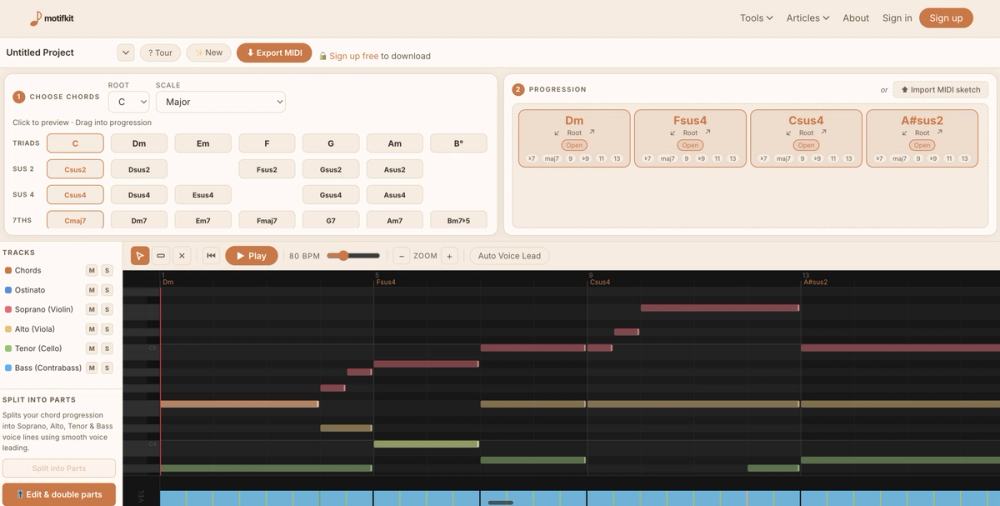
- Theory-aware chord palette for choosing a key, dragging diatonic chords into a progression, and adding sus chords, sevenths, and extensions.
- DAW-style piano roll where users can draw, drag, resize, and edit notes, or import a MIDI sketch started elsewhere.
- One-click orchestral split that turns a chord progression into soprano, alto, tenor, and bass lines with smooth voice leading and string-style MIDI exports.
- Ostinato pattern generation for layering arpeggios and accompaniment patterns over a progression with auto-voicing.
- Standalone music theory tools, including key signature exploration, chord browsing, melody-to-MIDI capture, ostinato generation, orchestral splitting, and interval ear training.
- A free-to-use model that keeps the tools accessible, with paid upgrades focused on unlimited MIDI exports and cloud project saves.
Use Cases
MotifKit is likely useful for composers who want to move from a blank canvas to a structured MIDI idea quickly. The MotifKit homepage describes a workflow where users can open Sketchpad, drop in a chord progression, and prepare a multi-track MIDI file for a DAW without setup or signup. That makes it especially relevant for early-stage sketching, harmonic exploration, and arranging ideas before committing to a larger production session.
Producers and songwriters may also use MotifKit as a bridge between music theory and practical MIDI creation. The visible tools support chord palette browsing, piano-roll editing, accompaniment patterns, and melody-to-MIDI capture, which suggests a workflow for turning rough musical thoughts into editable material. The product does not present itself as a complete DAW replacement; it appears better suited to idea generation, arrangement preparation, and MIDI export.
For orchestral or arrangement-focused work, the voice-splitting feature is one of the more specific signals on the site. Turning a progression into soprano, alto, tenor, and bass lines can help users test voicings before moving the result into a DAW or notation environment. A careful reader should confirm how well the exported MIDI maps to their preferred instruments, templates, and production setup.
Pricing
MotifKit says its tools stay free to use, with every tool unlocked and a free account required only for MIDI export. The visible pricing copy says the free tier includes 3 MIDI exports per month and no cloud saves, while upgrades are positioned around unlimited MIDI exports and unlimited cloud project saves. The pricing page also mentions founding member pricing for the first 100 customers, including yearly and lifetime options, along with future tool access for lifetime members; readers should check the current page before buying because the copy indicates paid plans and launch timing may change.
User Experience and Support
The public page emphasizes speed and low-friction access: no signup is needed to try the tools, and the Sketchpad is described as a single workspace for moving from idea to MIDI without breaking flow. The interface signals are familiar for musicians, including chord dragging, a piano-roll editor, playback and editing, MIDI import, and MIDI download.
Support details are less visible in the fetched evidence. The site includes common pricing questions, but it does not clearly show a help center, documentation hub, contact route, or support policy in the available copy. Users who plan to rely on MotifKit for regular composition work should verify how account help, billing questions, export issues, and saved project access are handled.
Technical Details
MotifKit is presented as a web-accessible composition and music theory toolkit that exports MIDI for use in a DAW. The visible evidence mentions MIDI import, MIDI export, multi-track MIDI output, playback and editing, cloud project saves on upgraded plans, and browser-style access without signup for trying the tools.
The site does not disclose a technical stack, API, plugin format, offline mode, or native desktop app in the available material. For most evaluators, the important technical question is less about infrastructure and more about MIDI fit: whether MotifKit's exported files work cleanly with their DAW, orchestral libraries, notation tools, and preferred arrangement workflow.
Pros and Cons
Pros
- Clear product identity for MIDI sketching, chord progression building, and orchestral arrangement preparation.
- Useful music-theory-aware tools are visible, including chord palettes, ostinatos, voice splitting, and interval training.
- Free access lowers the barrier for trying the workspace before creating an account or upgrading.
- Pricing signals are unusually specific about free exports, unlimited exports, cloud saves, and lifetime access.
- MIDI export focus makes the tool practical for musicians who finish work in a DAW.
Cons
- Support and documentation routes are not clearly visible from the fetched pages.
- The product appears focused on sketching and MIDI preparation, not full audio production or mixing.
- Free accounts are limited to 3 MIDI exports per month, according to the pricing copy.
- Users need to verify how exports behave with their specific DAW, templates, and instrument setup.
- Paid plan availability and founding member pricing should be checked on the live pricing page before purchase.
FAQ
What is MotifKit and what problem does it appear to solve?
MotifKit is a composition workspace and music theory toolkit for creating MIDI ideas. It appears designed to help musicians move from chords, melodies, and arrangement sketches into DAW-ready MIDI more quickly than starting from a blank session.
Who is MotifKit best suited for?
MotifKit is most relevant for songwriters, producers, and composers who work with MIDI and want a focused sketching environment. It may be especially useful for users who think in chord progressions, piano-roll editing, ostinato patterns, or orchestral voice leading.
What can users clearly do from the public site?
The site shows tools for building chord progressions, editing notes in a piano roll, generating ostinato patterns, splitting chords into soprano, alto, tenor, and bass lines, exploring theory concepts, and exporting MIDI. It also mentions importing a MIDI sketch started in a DAW.
Does MotifKit replace a DAW?
The public page does not present MotifKit as a full DAW replacement. It appears to be a composition sketchpad and MIDI preparation tool that can feed ideas into a DAW for further production, mixing, sound design, or arrangement work.
Is MotifKit free to use?
Yes, the pricing copy says every tool works fully and forever, with no signup needed to use the tools. A free account is required for MIDI export, and the visible free tier includes 3 MIDI exports per month.
What do paid MotifKit plans add?
The visible pricing information says upgrades focus on unlimited MIDI exports and cloud project saves. It also mentions yearly and lifetime options, founding member pricing for the first 100 customers, and future tool access for lifetime members.
What should users verify before relying on MotifKit?
Users should verify current pricing, account requirements, export limits, cloud save behavior, and support options. They should also test whether the MIDI exports fit their DAW, orchestral libraries, and composition workflow.
Does MotifKit show support or documentation details publicly?
The fetched pages show common pricing questions, but they do not clearly surface a full documentation area, help center, or contact path. Anyone planning to use MotifKit regularly should confirm where to get help with accounts, billing, saved projects, and export issues.
Conclusion
MotifKit stands out as a focused MIDI sketching environment for musicians who want chord tools, piano-roll editing, ostinato generation, and orchestral voice splitting in one place. The public site provides enough detail to understand its core workflow and pricing model, while leaving support depth and DAW-specific export behavior as items to verify. For composers and producers who often begin with harmonic ideas, MotifKit is worth evaluating as a lightweight bridge between music theory and finished MIDI.