
Introduction
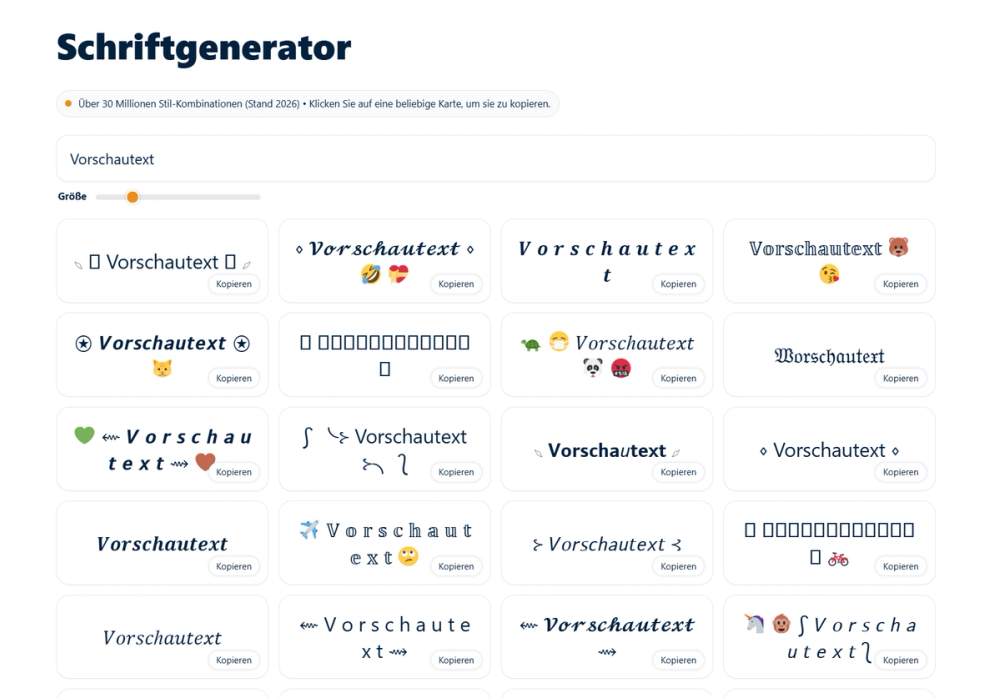
Schriften Generators is a free online tool that transforms plain text into stylized Unicode fonts, emojis, and decorative symbols. The platform offers over 30 million style combinations, allowing users to convert simple text like "Hallo" into 𝓗𝓮𝓵𝓵𝓸, 𝗛𝗲𝗹𝗹𝗼, or 🅷🅴🅻🅻🅾 with live preview and one-click copying.
The public page presents Schriften Generators as a browser-based utility designed for social media users, gamers, and content creators who want to add visual flair to their profiles, bios, and messages. Unlike image-based text generators, this tool uses Unicode characters that remain readable and copyable across platforms including Instagram, TikTok, WhatsApp, Discord, and gaming profiles.
Key Features
- Unicode Font Generator: Converts normal letters into special Unicode characters that display consistently across apps and devices
- Live Preview System: Shows text transformations in real-time as users scroll through different style categories
- One-Click Copying: Instantly copies styled text to clipboard without manual selection
- Vast Style Library: Over 30 million style combinations including cursive, bold, bubble text, Gothic, hacker/glitch effects, and aesthetic fonts
- Emoji and Symbol Integration: Combines fonts with decorative symbols, arrows, stars, hearts, zodiac signs, and gaming icons
- Mobile-Friendly Design: Works directly in browsers on smartphones and desktops without requiring app installation
- Text Editor: Allows word customization without losing the selected font style
- Multi-Language Support: Includes fonts for Arabic, Hindi, Japanese, and other languages alongside German and English
Use Cases
Schriften Generators appears most relevant for social media users wanting to stand out with distinctive profile bios and captions. The tool addresses the common frustration of plain text limitations on platforms like Instagram, TikTok, and Twitter by providing eye-catching alternatives that work within platform constraints.
Gamers may find value in creating unique usernames for profiles on Fortnite, PUBG, Free Fire, Roblox, Valorant, and Minecraft. The specialized gaming font section suggests particular attention to this audience, offering styles that align with gaming culture and aesthetic preferences.
Content creators and marketers can use the tool for quick branding elements-crafting memorable display names, highlighting key phrases in posts, or adding personality to messaging without learning design software. The "Branding-Schriftarten" feature implies some utility for small business owners seeking simple visual differentiation.
Casual users benefit from the tool's immediate gratification for personal messaging, creative writing, or simply experimenting with typographic styles for entertainment.
Pricing
Schriften Generators appears to be entirely free to use. The site describes itself as a "kostenloses Online-Tool" (free online tool) with no visible premium tiers, subscription options, or feature restrictions. All font styles, emojis, symbols, and copying functionality are publicly accessible without registration or payment.
User Experience and Support
The interface follows a three-step workflow: enter text, browse and select styles from organized categories, then copy and paste wherever needed. The categorization by platform (Discord, Instagram, WhatsApp) and aesthetic (Gothic, Vaporwave, Comic) helps users find relevant styles quickly rather than scrolling through endless options.
The site operates entirely in-browser, requiring no downloads, accounts, or permissions. This zero-friction approach makes it immediately accessible but also means no saved preferences, history, or user support infrastructure is visible.
Support appears limited to the tool's straightforward functionality. No contact information, documentation, or help center is visible in the extracted evidence. Users experiencing issues would likely need to troubleshoot independently or seek alternative tools.
Technical Details
Schriften Generators functions as a client-side web application built around Unicode text transformation. Rather than generating images, it maps standard ASCII characters to their Unicode equivalents in various mathematical alphanumeric symbol blocks and special character ranges.
The tool works across platforms because Unicode is a universal standard supported by modern operating systems, browsers, and apps. However, the public page notes that some generated styles may sacrifice readability for visual flair, particularly for users with visual impairments.
No API, export options, or integration capabilities are mentioned in the available evidence. The tool appears designed purely for manual, one-off text generation rather than automated workflows or bulk processing.
Pros and Cons
Pros
- Free access to millions of font combinations without registration or payment
- Works immediately in any browser without app installation
- Live preview eliminates guesswork before copying
- Unicode-based output remains selectable, searchable, and accessible unlike image-based alternatives
- Covers broad aesthetic range from professional branding to playful gaming styles
- Mobile-friendly interface supports on-the-go content creation
Cons
- Limited to character-by-character transformation; cannot style entire documents efficiently
- Some decorative fonts sacrifice readability, particularly for accessibility purposes
- No save functionality, user accounts, or history for recurring style needs
- Support and documentation appear minimal based on visible evidence
- Advertisement-supported model may include banner ads that interrupt workflow
- Platform compatibility varies; some apps may not render all Unicode characters correctly
FAQ
What is Schriften Generators and how does it work?
Schriften Generators is a free browser-based tool that converts plain text into stylized Unicode fonts, emojis, and symbols. Users enter text, browse style categories with live preview, click to copy their chosen style, and paste it into social media profiles, messages, or gaming accounts. The tool uses Unicode character mapping rather than image generation, ensuring text remains selectable and readable across platforms.
Who should use Schriften Generators?
The tool appears designed for social media users wanting distinctive bios and captions, gamers seeking unique usernames, content creators adding visual flair to posts, and anyone wanting to personalize text for messaging or creative projects. It suits users who value immediate results over advanced design capabilities.
What platforms are compatible with the generated fonts?
According to the public site, generated fonts work on Instagram, TikTok, WhatsApp, Discord, X (Twitter), Facebook, Snapchat, YouTube, Twitch, Threads, Reddit, LinkedIn, Bluesky, Telegram, Tumblr, and various gaming platforms. However, users should verify specific character rendering on their target platform, as Unicode support varies by app and device.
Does Schriften Generators work on mobile devices?
Yes, the site is explicitly described as mobile-friendly and functions in smartphone browsers without requiring app installation. Users can generate and copy stylized text directly on their phones for immediate use in mobile apps.
Are there any costs or limitations?
The tool appears completely free with no visible premium features or usage limits. All 30+ million style combinations, emojis, and symbols are publicly accessible. The main practical limitation is that decorative fonts may reduce readability, especially in longer text or for users with visual impairments.
What types of font styles are available?
The site offers extensive categories including cursive scripts, bold text, bubble letters, Gothic and Old English, hacker/matrix effects, glitch text, vaporwave aesthetics, comic styles, wide text, underlined text, strikethrough, small text, and number/letter variations. Gaming-specific styles for popular titles are also included.
Conclusion
Schriften Generators delivers a straightforward solution for users wanting stylized text without learning design software or creating image-based graphics. The Unicode approach ensures cross-platform compatibility while maintaining text selectability-advantages over screenshot or graphic-based alternatives.
The tool's value lies in its simplicity: enter text, choose a style, copy, and paste. For social media bios, gaming handles, and casual creative projects, this workflow removes friction and delivers immediate results. However, users requiring accessibility-conscious design, bulk processing, or advanced typographic control may find the tool's decorative focus limiting. As a free utility requiring no commitment, it serves as a practical starting point for text personalization before investing in professional design tools.