
Introduction
PlagScanPro is a free online plagiarism checker aimed at long documents-up to 50,000 words per scan-without requiring an account. The public site compares submitted text against web sources and returns a similarity report with multiple metrics, typically in about 30-50 seconds. Students, authors, and content teams should treat similarity scores as guidance for review and citation, not as a substitute for institutional academic policies.
Key Features
- Large single-scan limit: Up to 50,000 words per article, positioned as an alternative to tools that cap free checks around 1,000 words.
- No signup: Paste text or upload a file and run a scan without creating an account or providing payment details.
- Detailed report: Overall detected similarity, original-content percentage, source count, vocabulary overlap, sentence similarity, phrase match (N-Gram Engine 2.0), common-word analysis with stemming, and keyword or semantic cluster signals.
- Privacy positioning: Marketing states submitted text is processed against the web and not stored, saved, or shared with third parties.
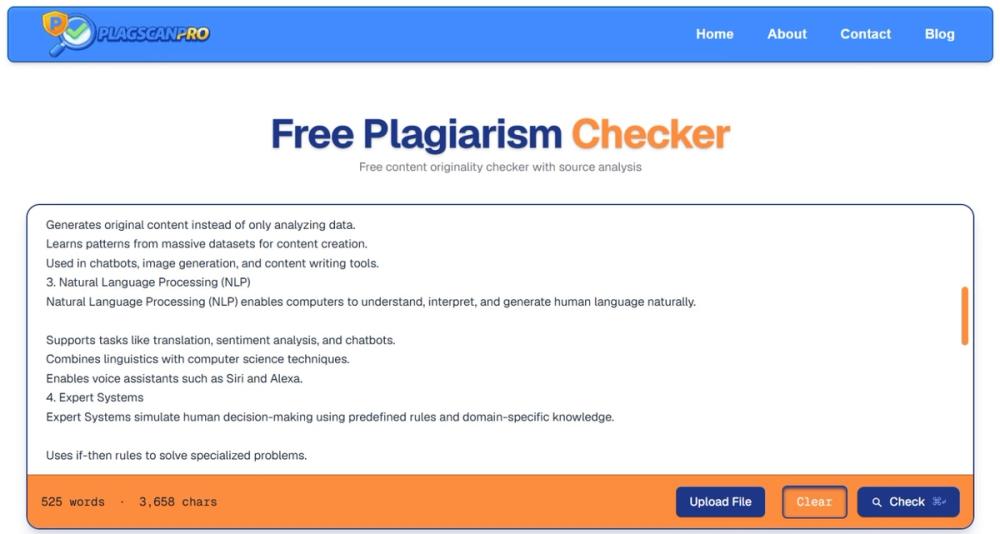
- File upload: Supports pasting in the editor or uploading a document from the homepage scanner.
- Report guidance: On-page copy explains how to interpret mismatched scores and when to cite, rewrite, or ignore common terminology overlaps.
Use Cases
University students checking theses, literature reviews, or long research papers may run one scan instead of splitting work into small chunks. Self-published authors and freelancers can review manuscript-scale drafts before publication while relying on the site's no-storage claims for confidentiality comfort.
Bloggers and SEO-focused writers may scan posts for overlap with existing web content before publishing. The about page frames the product around dissertations, book drafts, and marketing content originality checks.
Pricing
PlagScanPro is described as 100% free with no hidden charges, no credit card, and no stated limit on the number of scans in homepage FAQ copy. There are no paid tiers visible on the fetched pages-confirm on the live site if that changes.
User Experience and Support
The flow is: open the scanner, paste or upload, click Check, then read the plagiarism report breakdown. Keyboard shortcut hints (e.g., check shortcut) appear on the scanner UI.
Questions and feedback go through the contact page via email or a send-message form; the site notes responses may take time and that the tool remains free. Privacy Policy and Terms & Conditions are linked in the footer alongside Blog and About.
Technical Details
The checker analyzes content against millions of web sources per FAQ wording. Report engines mentioned include N-Gram Engine 2.0 for phrase matching, stemming for common-word metrics, and semantic cluster mapping for keyword-match signals. No public API, LMS integration, or batch API documentation appeared on the fetched pages.
Pros and Cons
Pros
- High per-scan word limit relative to many free competitors described on the about page.
- No account wall for quick checks.
- Rich metric breakdown helps distinguish phrase copying from vocabulary overlap alone.
- Fast stated turnaround (roughly 30-50 seconds) for long text.
- Explicit report instructions for academic integrity actions (cite or rewrite).
Cons
- Web-source-only comparison may miss offline books, paywalled journals, or private corpora.
- SEO and Google ranking claims are general; search outcomes depend on many factors beyond similarity tools.
- Free-service support may be slower per contact-page disclaimer.
- Institutions may require specific approved checkers-verify policy before relying on PlagScanPro alone.
FAQ
What is PlagScanPro?
A free plagiarism and content originality checker that scans text against online sources and returns a detailed similarity report.
How many words can I scan at once?
The site states support for up to 50,000 words per scan.
Do I need an account?
No-public copy emphasizes no sign-up and no email required to run a scan.
Is my document stored?
The site claims text is not stored, saved, or shared after processing; confirm details in the Privacy Policy for your use case.
How long does a scan take?
FAQ copy cites most scans completing in about 30 to 50 seconds.
How do I read the plagiarism percentage?
It reflects combined overlap across detected sources, not necessarily copying from a single page; the report separates sentence, phrase, and vocabulary signals for context.
Who is PlagScanPro for?
The about page highlights students and academics, authors and writers, and SEO or content creators checking blogs and articles.
Conclusion
PlagScanPro at plagscanpro.com offers a no-signup, free plagiarism scan for large documents with multi-metric reports and privacy-oriented messaging. It suits users who need a single-pass check on long text and will interpret results carefully, cite sources where needed, and confirm institutional or publisher requirements separately.