
Introduction
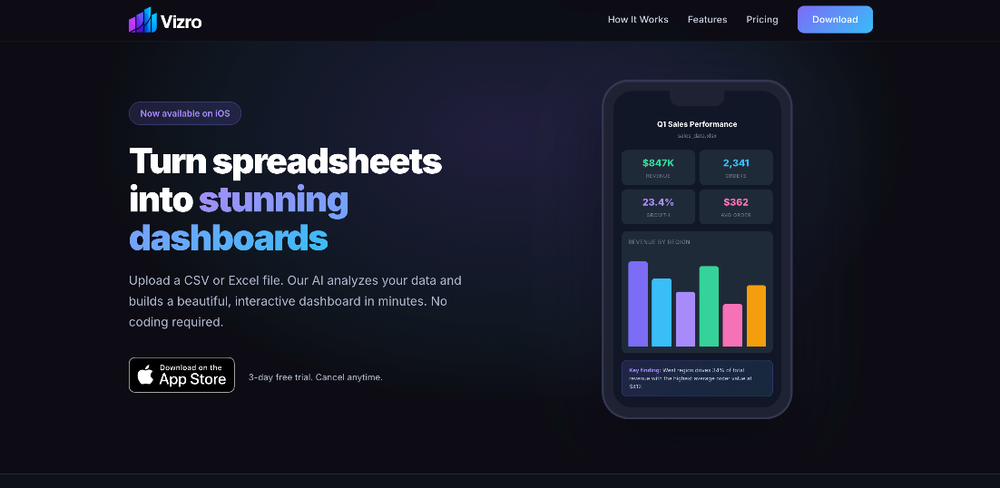
Vizro is an iOS app that turns spreadsheet data into interactive, AI-generated dashboards. Upload a CSV or Excel file, and the app analyzes the content to produce charts, KPIs, tables, and filters without requiring any coding or manual chart configuration. The goal is to get from raw data to a visual overview in minutes rather than hours.
The app targets individuals and small teams who work with spreadsheet data regularly but do not have access to a dedicated data team or BI tool. By combining automatic visualization with natural-language data querying, Vizro positions itself as a quick-access dashboard layer for everyday spreadsheet workflows.
Key Features
- Automatic dashboard generation: Upload a CSV or Excel file and receive a complete interactive dashboard with charts, KPIs, tables, and filters generated based on what the data actually contains.
- Ask Your Data: Chat with your dataset using plain English questions and receive AI-powered answers grounded in your actual numbers, useful for quick follow-up analysis without writing formulas.
- Story Mode: Convert your dashboard into a swipeable slide-deck presentation, making it straightforward to share insights with a team or stakeholder without building a separate deck.
- Share with PIN protection: Generate shareable dashboard links with optional PIN protection for sharing with team members, clients, or collaborators.
- Multi-sheet and large-dataset support: The app handles multiple sheets, thousands of rows, and real-world messy data formats, reducing the need to clean or restructure files before upload.
Use Cases
For individuals who track sales, expenses, or project metrics in spreadsheets, Vizro provides a faster path to visualizing trends and outliers without exporting to a separate BI tool. The three-step process (upload, analyze, explore) is designed to fit into ad-hoc analysis moments, like reviewing quarterly numbers or preparing for a quick team check-in.
Small teams that need to share data insights with stakeholders can use Story Mode to turn a dashboard into a presentation-ready format. This is practical for scenarios where someone needs to walk a client or manager through key numbers without spending time formatting slides. The Ask Your Data feature also supports quick exploratory questions, such as asking which region drove the most revenue or identifying the largest order in a dataset.
Pricing
Vizro offers a 3-day free trial, after which the subscription auto-renews at 9.99 dollars per month. The subscription includes everything the app can do with no limits: unlimited AI-generated dashboards, Story Mode presentations, Ask Your Data conversations, CSV and Excel support, shareable dashboards with PIN protection, and no ads or watermarks. Cancellation is managed through Apple ID settings.
User Experience and Support
The app is available on iOS and designed around a simple three-step workflow: upload, let AI analyze, and explore the resulting dashboard. The interface emphasizes ease of use, with no coding required. Support details are not prominently featured on the public-facing pages, so users may need to rely on the app's built-in help resources or reach out through available channels for specific questions.
Technical Details
Vizro processes CSV and Excel files, including support for multiple sheets and large datasets with thousands of rows. The AI layer handles pattern detection, trend identification, outlier recognition, and chart selection. Dashboards are interactive with filters, search, and sortable tables. The app is currently available on iOS only, with no mention of Android, web, or desktop versions on the public pages. Shareable links with PIN protection are supported for collaborative access.
Pros and Cons
Pros
- Fast path from raw spreadsheet to interactive dashboard, with no setup or configuration required
- Ask Your Data feature adds practical value for quick follow-up questions without writing formulas
- Story Mode eliminates the need to rebuild data insights into a separate presentation
- Simple pricing with a single tier that includes all features
Cons
- Currently available on iOS only, with no Android or web version mentioned
- The 3-day trial period is relatively short for evaluating whether the AI analysis quality meets your needs for different data types
- Support and documentation details are not clearly visible on the public pages
- No mention of API access, integrations with other tools, or data export options beyond sharing links
FAQ
What is Vizro and what does it do?
Vizro is an iOS app that converts spreadsheet data into interactive, AI-generated dashboards. Upload a CSV or Excel file, and the app automatically produces charts, KPIs, tables, and filters based on your data.
Who is Vizro best suited for?
The app appears most relevant for individuals and small teams who work with spreadsheet data regularly but do not have access to a dedicated data team or BI platform. It is designed for quick analysis and sharing rather than deep data modeling.
What file formats does Vizro support?
Vizro supports CSV and Excel files, including multiple sheets and large datasets with thousands of rows. The app is designed to handle messy, real-world data without requiring pre-cleaning.
Does Vizro offer a free trial?
Yes. Vizro provides a 3-day free trial before the subscription begins. The trial includes full access to all features, and the subscription auto-renews monthly at 9.99 dollars unless canceled through Apple ID settings.
Can I share dashboards with others?
Yes. Vizro lets you generate shareable links to any dashboard, with optional PIN protection for controlled access. This is useful for sharing with team members or clients without requiring them to have the app installed.
Is Vizro available on Android or the web?
Based on the visible evidence, Vizro is currently available on iOS only. There is no mention of Android, web, or desktop versions on the public pages.
What should I verify before committing to a subscription?
Since the trial is short, it is worth testing the app with the specific types of data you work with to confirm the AI analysis quality and chart selection match your expectations. Also worth checking are data privacy handling and whether the app supports any export or integration options beyond shareable links.
Conclusion
Vizro fills a specific niche for spreadsheet users who want fast, AI-assisted visualization without the overhead of a full BI tool. The combination of automatic dashboard generation, natural-language querying, and built-in presentation mode makes it practical for quick analysis and sharing scenarios. The single-tier pricing and iOS-only availability keep the scope narrow, so it is most useful for individuals and small teams whose workflows fit within those boundaries. Trying the 3-day trial with your own data is the most direct way to evaluate whether the output quality and feature set match your needs.