
Introduction
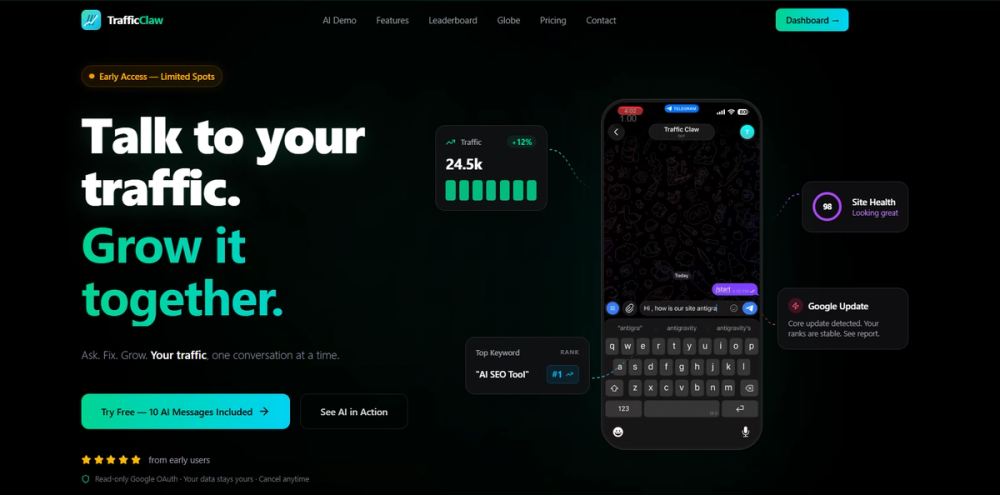
TrafficClaw is an AI-powered SEO and analytics platform positioned as an alternative layer to Google Analytics for growth teams. The public page highlights AI traffic chat, live dashboards, a real-time visitor globe, embeddable X and Reddit mentions, traffic alerts, and SEO automation features. It appears most relevant for founders, marketers, and growth teams that want analytics to be easier to ask about, share, and present.
Key Features
- AI traffic chat for asking plain-English questions about traffic, pages, sources, and sessions.
- Live interactive globe that maps active visitors in real time.
- Shareable dashboards for making traffic changes easier to show to teams or clients.
- No-code embeds for real-time X mentions and Reddit mentions.
- SEO bot features including AI blog writer, auto keyword research, AI smart linking, content decay detection, cannibalization scanning, and Core Web Vitals checks.
- Google sign-in and references to monitoring Google Analytics and Search Console.
Use Cases
TrafficClaw is useful for growth teams that want faster answers from analytics data. Instead of hunting through multiple reports, the product promises a chat-style interface where users can ask what is happening with traffic and what to fix. That can help founders or marketers who need quick explanations during launches, campaigns, or traffic changes.
The live globe and shareable dashboard features also make sense for public-facing or client-facing reporting. The page describes embedding a real-time globe on landing pages, sharing it with clients, or running it on a big screen during a launch. This is a more presentation-oriented use case than traditional analytics reporting.
The social proof tools are another practical angle. TrafficClaw mentions embeddable X mentions and Reddit mentions, which could help teams turn community attention into visible trust signals. Teams should verify moderation controls and embed behavior before placing social mentions on important conversion pages.
Pricing
The fetched evidence does not show a full pricing table, plan names, billing cycles, trial limits, or subscription prices. It does include plan-like signals such as 150 AI credits per month and 300 AI credits per month plus Telegram bot, but the surrounding plan details are not clear. Users should verify pricing, AI credit limits, connected data sources, alert limits, and cancellation terms directly before depending on TrafficClaw for regular reporting.
User Experience and Support
TrafficClaw's user experience is built around making analytics more conversational and visual. The page repeatedly frames the product as a way to talk to traffic data, open a live dashboard, view a real-time globe, and make growth easier to see. That is a useful distinction for teams that find standard analytics dashboards difficult to explain.
Support signals are limited in the captured public evidence. The page shows Google sign-in and product demos, but it does not clearly show a help center, support email, live chat, documentation hub, or service-level expectations. Teams using it for client reporting or launch monitoring should confirm support channels and incident handling before relying on it during time-sensitive campaigns.
Technical Details
TrafficClaw appears to connect with analytics and search data sources, with visible references to monitoring Google Analytics and Search Console. It also includes AI chat, traffic alerts, automated fixes, a live visitor globe, no-code embeds, real-time X and Reddit mentions, and SEO automation tools.
The SEO bot feature set includes auto keyword research, smart internal linking, content decay detection, cannibalization scanning, Core Web Vitals, and an AI blog writer. The page does not clearly explain permissions, data retention, export formats, API access, embed customization, alert delivery channels beyond a Telegram bot mention, or how automated fixes are reviewed before implementation. These are important details for teams connecting analytics or search accounts.
Pros and Cons
Pros
- Conversational analytics can make traffic questions easier to answer without building reports manually.
- Live dashboards and a real-time globe are useful for launches, client updates, and public-facing momentum displays.
- No-code embeds for X and Reddit mentions can turn social activity into visible proof.
- SEO bot features cover keyword research, internal linking, content decay, cannibalization, and Core Web Vitals.
- Google Analytics and Search Console monitoring are visible in the product positioning.
Cons
- Full pricing and plan limits are not clearly visible in the fetched evidence.
- Support routes and documentation are not clearly shown.
- Teams should verify permissions and data handling before connecting analytics or search accounts.
- Automated SEO suggestions should be reviewed before implementation.
- Social mention embeds need moderation controls to avoid showing irrelevant or low-quality mentions.
FAQ
What is TrafficClaw?
TrafficClaw is an AI-powered SEO and analytics platform for growth teams. It offers AI traffic chat, live dashboards, a real-time visitor globe, social mention embeds, traffic alerts, and SEO automation features.
Who is TrafficClaw for?
TrafficClaw appears aimed at founders, marketers, growth teams, SEO teams, and agencies that want analytics to be easier to ask about, share, and present to stakeholders.
How does TrafficClaw differ from Google Analytics?
The public page positions TrafficClaw as a more conversational and visual analytics layer. Users can ask plain-English traffic questions, view live dashboards, and use presentation-friendly surfaces such as a real-time globe.
Does TrafficClaw connect to Google Analytics or Search Console?
The page mentions monitoring Google Analytics and Search Console. Users should verify setup requirements, permissions, supported properties, and data refresh behavior before connecting accounts.
What is the TrafficClaw SEO Bot?
The SEO Bot is described as an autonomous AI agent that analyzes a site and supports tasks such as auto keyword research, smart internal links, content decay detection, cannibalization scanning, Core Web Vitals checks, and AI blog writing.
Can TrafficClaw show social proof?
Yes. The page mentions no-code embeds for real-time X mentions and Reddit mentions. Teams should check moderation and display controls before using these embeds on conversion pages.
How much does TrafficClaw cost?
The captured evidence does not show complete pricing. It mentions AI credit amounts such as 150 credits per month and 300 credits per month plus Telegram bot, but users should check the current pricing page for exact plans and limits.
What should teams verify before adopting TrafficClaw?
Teams should verify pricing, data source permissions, AI credit limits, alerting channels, support routes, embed controls, privacy terms, export options, and whether automated SEO recommendations require manual approval.
Conclusion
TrafficClaw is a visually oriented analytics and SEO platform that tries to make traffic data easier to ask about, explain, and display. Its strongest public signals are AI traffic chat, live dashboards, real-time visitor visualization, social mention embeds, and SEO bot features. The main details to verify are pricing, support, data handling, and the controls around automated SEO and social proof features.