
Introduction
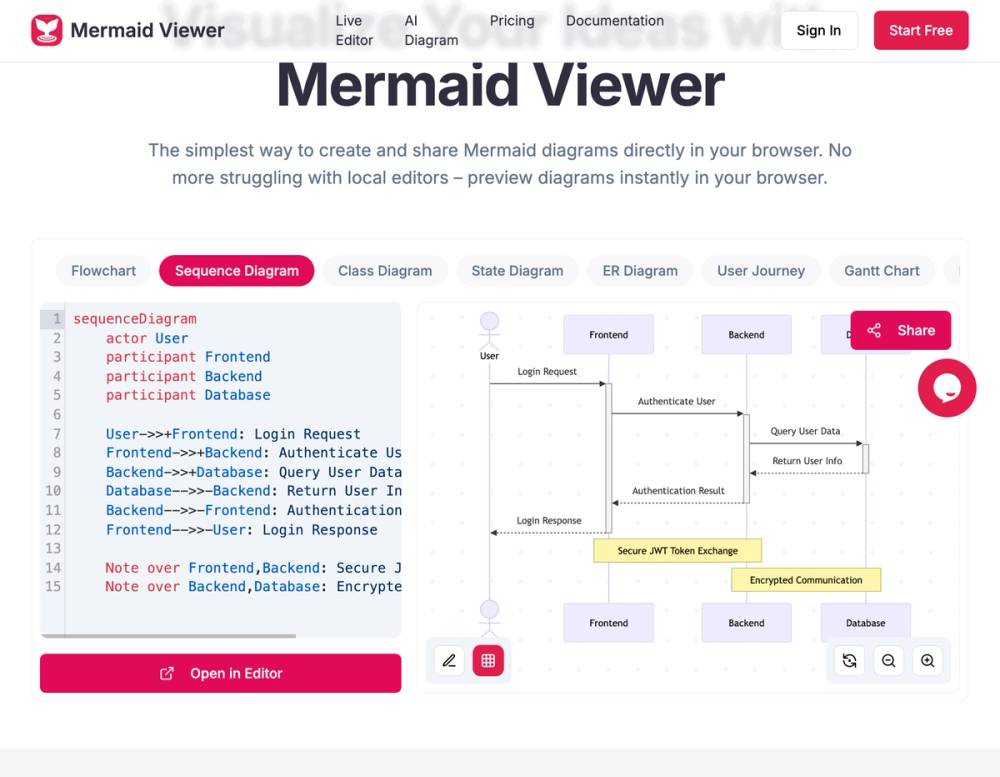
MermaidViewer is an online Mermaid diagram editor for creating, editing, previewing, sharing, and exporting diagrams in the browser. The site highlights live preview, AI-assisted Mermaid code generation, smart export, debugging, collaboration, templates, and enterprise deployment options. It appears most relevant for developers, product teams, technical writers, educators, and engineering managers who want a faster way to turn Mermaid code into readable diagrams.
Key Features
- Live preview that visualizes diagram changes as users type, without a separate render button.
- AI-assisted coding with a "Generate with GPT-4" button that converts text descriptions into Mermaid code.
- Smart export for SVG, PNG, Markdown, and PDF, with references to custom DPI and dark or light themes.
- Smart debugging with syntax error highlighting and auto-correction suggestions.
- Real-time collaboration through shareable editor links for team co-editing.
- Enterprise integration signals, including Docker private deployment and role-based access control.
Use Cases
MermaidViewer is useful for developers and technical teams that already use Mermaid syntax but want an easier way to preview and share diagrams. Flowcharts, timelines, governance processes, course lifecycles, and wireframe collaboration flows are visible among the recommended templates, which suggests the tool can support both software and process documentation.
The AI-assisted coding feature is a practical fit for users who know what they want to explain but do not want to write every Mermaid line manually. A product manager could describe a workflow, a teacher could outline a timeline, or an engineer could draft a process diagram and then refine the generated Mermaid code.
Teams may also use MermaidViewer for collaborative documentation. Shareable editor links, export options, and private deployment signals make it relevant for internal architecture notes, onboarding materials, RFCs, technical specs, and stakeholder-facing process diagrams. Users should verify plan limits and data handling before using it for sensitive internal systems.
Pricing
MermaidViewer shows a Free plan at $0, described as suitable for getting started. Visible limits include 3 diagrams, 5 AI conversations per day, low-resolution PNG export with watermark, basic sharing, and no version history. The page also shows higher-tier signals such as 500 AI conversations per month, high-resolution PNG export without watermark, unlimited sharing, priority support, monthly and yearly billing, and a 17% annual billing saving.
The site does not provide the full paid plan table in the captured text, so users should check the live pricing section for exact tier names, prices, diagram limits, export rules, collaboration limits, and enterprise deployment costs.
User Experience and Support
The basic user path is straightforward: enter Mermaid code, preview the diagram in real time, and export it as SVG, PNG, or PDF. The page also emphasizes no signup for getting started, which lowers friction for quick diagrams or one-off documentation tasks.
Support information is partly tied to pricing. Priority support appears as a plan-related feature, but the visible page does not show a help center, support email, documentation portal, or live chat route. Teams evaluating paid use should confirm what support is included, especially if they need Docker deployment, role-based access control, or collaboration support.
Technical Details
MermaidViewer is a browser-based developer application focused on Mermaid diagrams. Technical signals include live rendering, AI-assisted code generation, syntax highlighting, auto-correction suggestions, export to SVG, PNG, Markdown, and PDF, dark and light themes, custom DPI, shareable editor links, and private Docker deployment.
The page also states that data stays in the browser and that the service does not store anything. That is a useful privacy signal for quick diagram editing, though teams should still verify how collaboration links, AI conversations, and enterprise deployments handle diagram content. The site does not clearly show API access, version-control integration, GitHub integration, SSO, audit logs, or import/export automation beyond the listed export formats.
Pros and Cons
Pros
- Live preview makes Mermaid editing faster and easier to troubleshoot.
- AI-assisted generation can help users turn plain-language descriptions into Mermaid code.
- Export options cover common documentation formats such as SVG, PNG, Markdown, and PDF.
- Templates help users start with common diagram types instead of blank syntax.
- Enterprise signals such as Docker private deployment and role-based access control are useful for teams.
Cons
- Full paid pricing details are not clearly visible in the captured page text.
- The free plan has limits such as 3 diagrams, daily AI conversation limits, watermarking, and no version history.
- Support routes beyond priority support are not clearly shown.
- Teams should verify how AI conversations and collaboration links handle sensitive diagram content.
- Integrations with GitHub, docs platforms, or project management tools are not clearly visible.
FAQ
What is MermaidViewer?
MermaidViewer is an online diagram editor for Mermaid diagrams. It lets users create, edit, preview, share, and export diagrams directly in the browser.
Who is MermaidViewer for?
It is designed for developers, technical writers, product managers, educators, and teams that need Mermaid diagrams for documentation, workflows, timelines, architecture notes, or process explanations.
Does MermaidViewer support live preview?
Yes. The page says MermaidViewer visualizes changes as users type, without requiring a separate render button.
Can MermaidViewer generate Mermaid code with AI?
Yes. The site mentions a "Generate with GPT-4" button that converts text descriptions into Mermaid code. Users should review generated code before publishing diagrams in important documentation.
What export formats does MermaidViewer support?
The page mentions export to SVG, PNG, Markdown, and PDF. It also references custom DPI and dark or light theme options for exports.
Is MermaidViewer free?
MermaidViewer has a Free plan at $0. The visible limits include 3 diagrams, 5 AI conversations per day, low-resolution PNG export with watermark, basic sharing, and no version history.
Does MermaidViewer support teams or enterprise use?
The page mentions real-time collaboration, shareable editor links, Docker private deployment, and role-based access control. Teams should verify pricing, deployment requirements, and security details before adopting it.
Does MermaidViewer store diagram data?
The page says data stays in the browser and that the service does not store anything. Users should still check how this applies to shared links, AI-assisted coding, account plans, and enterprise deployments.
Conclusion
MermaidViewer is a focused Mermaid diagram editor with live preview, AI-assisted coding, smart export, debugging, templates, and collaboration features. Its strongest public signals are browser-based editing, no-signup startup, multi-format export, and enterprise deployment options. The main details to verify are paid plan pricing, collaboration data handling, AI usage limits, and integrations with a team's documentation workflow.