
Introduction
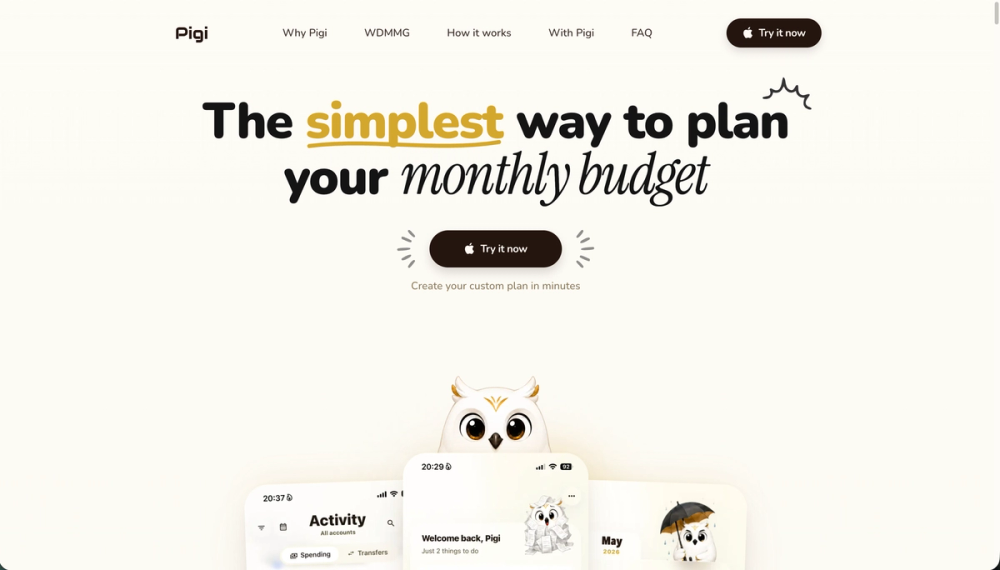
Pigi is a monthly budget app built around zero-based budgeting: you assign every dollar a job, track spending by category, and see what is still safe to spend before you tap. The public site emphasizes reducing end-of-month surprises and guilt-driven spending rather than only logging transactions after the fact. Pricing and bank-link details were not prominent on the fetched homepage-confirm plans and data practices in-app or on live product pages before signing up.
Key Features
- Zero-based monthly plan: Start with money already in your account, then allocate to rent, groceries, transport, savings, fun, and other categories you define.
- Safe-to-spend visibility: See remaining room in each category without constantly opening your bank app.
- Non-monthly sinking funds: Set aside for irregular costs-car repairs, holidays, yearly bills, subscriptions-that do not hit every paycheck.
- Goal funding: Move holidays, emergency funds, and large purchases from "someday" into explicit monthly lines.
- Flexible adjustments: Move money between categories when life changes without treating replanning as failure.
- Subscription awareness: Marketing references monthly totals, renewal calendars, and yearly cost views for recurring charges.
- Educational content: Navigation includes Why Pigi, How it works, WDMMG ("Where did my money go?"), FAQ, and a monthly budget planner guide.
Use Cases
Paycheck-to-paycheck households can plan the month on the 1st instead of half-guessing balances after each purchase. People stressed by surprise expenses may use sinking funds for irregular bills and clearer category limits.
Couples or individuals who want guilt-free discretionary spending can pre-approve dining or trips in the plan. Goal-oriented savers can fund trips, moving costs, school, or a car buffer as named categories alongside essentials.
Pricing
The homepage drives Try it now and Create your custom plan in minutes without listing dollar amounts on the fetched page. Treat Pigi as a consumer budget product whose current free or paid tiers should be verified at getpigi.com or inside the app before relying on specific limits.
User Experience and Support
Site structure: Pigi, Why Pigi, WDMMG, How it works, With Pigi, FAQ, and Try now CTAs. The five-step story covers starting with current cash, giving dollars jobs, preparing for non-monthly stuff, funding priorities, and adjusting as life changes.
Support signals point to FAQ and the monthly budget planner guide linked from feature copy. No dedicated support email or ticket system appeared on the single fetched homepage-use in-app help or contact options on the live site if available.
Technical Details
Pigi is positioned as a zero-based budget app and expense tracker in page metadata. The fetched homepage does not document bank aggregators, open banking APIs, mobile platform details, or export formats. Integration and security specifics should be confirmed from official privacy or product documentation not captured in this crawl.
Pros and Cons
Pros
- Clear zero-based methodology aligned with "give every dollar a job."
- Emphasis on proactive safe-to-spend answers vs. post-hoc statement scrolling.
- Non-monthly and goal categories address common budget failure modes.
- Flexible moves between categories support real-life changes.
- Educational guides and FAQ may help new budgeters.
Cons
- Public pricing transparency is limited on fetched content.
- Bank sync and technical architecture are unclear from homepage alone.
- Not a substitute for professional financial advice or tax planning.
- Feature depth (e.g., subscription tracking) should be validated in the product.
FAQ
What is Pigi?
A monthly budget app for zero-based planning, expense tracking, and knowing what is safe to spend in each category.
What is zero-based budgeting in Pigi?
You assign the money you already have to specific jobs (categories) so income minus allocations equals zero, with room for savings and goals.
Can Pigi help with irregular expenses?
Yes-copy describes setting aside funds for expenses that do not appear every month but recur over time.
Does Pigi reduce end-of-month panic?
The site positions Pigi as showing what is left to spend any day and planning on the 1st so dollars have jobs before spending.
Who is Pigi for?
People who want intentional monthly plans, category-level visibility, and goal lines for emergencies, trips, or large purchases.
Where can I learn how to use it?
The site links a monthly budget planner guide and includes How it works, With Pigi, and FAQ sections.
How do I get started?
Use Try it now on getpigi.com to create a custom plan in minutes per homepage CTAs.
Conclusion
Pigi at getpigi.com targets users who want zero-based monthly budgeting with category safe-to-spend clarity and sinking funds for irregular costs. It fits anyone willing to plan on purpose, adjust categories as life changes, and confirm current pricing and bank features directly in the product.