
Introduction
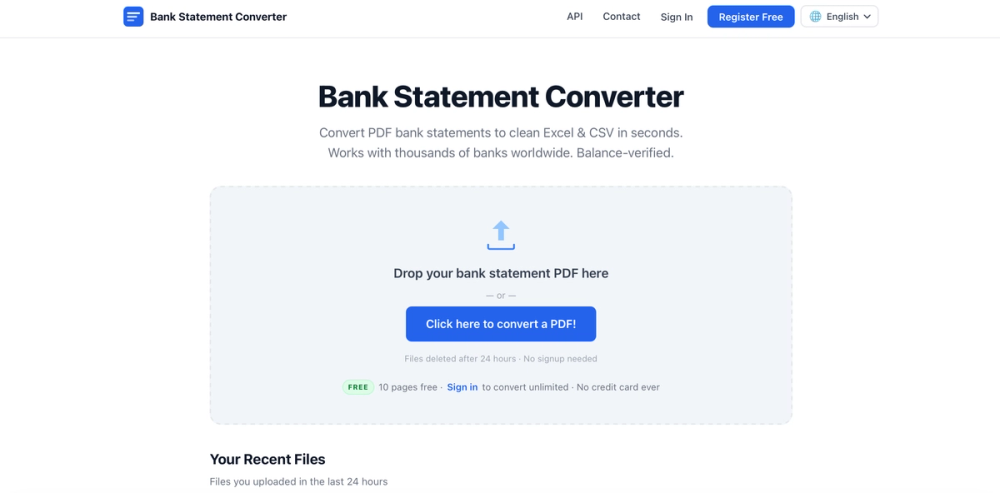
Bank Statement Converter is a free online tool that transforms PDF bank statements into structured data formats including Excel, CSV, and JSON. The platform supports thousands of banks worldwide and processes files with balance verification, offering both a web interface for manual conversions and a REST API for programmatic integration.
The public page presents Bank Statement Converter as a privacy-focused solution for accountants, bookkeepers, developers, and individuals who need to extract transaction data from bank statements without manual data entry. Files are automatically deleted after 24 hours, and the service requires no credit card or subscription for basic use.
Key Features
- PDF to Excel Conversion: Exports to XLSX format compatible with Microsoft Excel, Google Sheets, and Apple Numbers
- CSV Export: Generates CSV files importable into accounting software like Xero, Zoho Books, and Sage
- JSON Output: Provides structured transaction data for developers integrating via the REST API
- OCR for Scanned PDFs: Handles scanned statements with optical character recognition (typically 15-30 seconds processing time)
- Password-Protected PDF Support: Can unlock and convert password-protected bank statement PDFs
- Multi-Bank Compatibility: Works with statements from thousands of banks across USA, India, UK, Europe, Australia, Middle East, and Africa
- Balance Verification: Validates extracted data against statement balances for accuracy
- Multiple Output Formats: Includes Tally CSV/XML, QBO (QuickBooks), and standard spreadsheet formats
- Bulk Conversion: Registered users can convert multiple files and combine them into a single CSV
- Editable Preview: Allows in-browser editing of extracted data before downloading
Use Cases
Bank Statement Converter appears most relevant for small business owners and freelancers who need to import bank transactions into accounting software without manual entry. The CSV exports work with popular platforms like Xero, Zoho Books, and Sage, suggesting the tool bridges the gap between bank-provided PDFs and accounting system requirements.
Bookkeepers and accountants handling multiple client accounts may find value in the bulk conversion capabilities and editable preview feature, which allows correction of extraction errors before importing. The 24-hour file history helps users retrieve recent conversions without re-uploading.
Developers building financial applications can integrate the REST API to automate statement processing for their users. The JSON output and authenticated endpoints suggest suitability for fintech products, expense tracking apps, or automated bookkeeping solutions.
Individuals needing occasional statement conversion-such as for loan applications, tax preparation, or personal record-keeping-benefit from the free tier that handles up to 10 pages without registration.
Pricing
Bank Statement Converter operates on a freemium model with no subscription requirements:
Anonymous Users (no account):
- 10 pages per day free
- CSV and Excel downloads
- Password-protected PDF support
- 24-hour file history
Registered Users (free account):
- Unlimited pages
- Bulk conversion of multiple files
- API access with authentication
- Higher rate limits available on request
The public page emphasizes "no credit card ever" and "no subscriptions," positioning the service as genuinely free for typical usage. Custom volume plans and higher API rate limits are available by contacting the team, suggesting enterprise or high-volume use cases can be accommodated.
User Experience and Support
The interface follows a minimal three-step workflow: upload PDF, wait for processing, download in chosen format. Users can preview and edit extracted data directly in the browser before committing to a download. The recent files feature allows retrieval of conversions from the last 24 hours.
Error handling includes manual OCR extraction options when automatic conversion fails, and users can report problematic files for the team to review. Support response time is stated as 1-2 business days, with faster turnaround for urgent issues that include the conversion run ID.
Multilingual support is visible through language options including English, Chinese, Japanese, Spanish, French, Hindi, Arabic, and Portuguese. The site operates entirely in-browser with no software installation required.
Technical Details
Bank Statement Converter functions as a web application with server-side PDF processing. Security measures include HTTPS encryption and automatic file deletion after 24 hours. The platform handles both digitally-generated PDFs and scanned documents requiring OCR.
The REST API provides programmatic access with the following characteristics:
- Authentication: API key via Authorization header
- Input: PDF uploads via HTTP POST
- Output: JSON transaction data with download links for file formats
- Rate Limits: Apply to API usage, with higher limits available on request
- SDKs: Official Python, Node.js, and PHP SDKs planned; currently works with any HTTP client
The API documentation indicates structured JSON responses containing transaction data extracted from statements. Results remain available for 24 hours via run_id retrieval endpoints.
Pros and Cons
Pros
- Free for typical usage (10 pages/day) with no credit card required
- Supports thousands of banks globally with balance verification
- Multiple export formats compatible with major accounting software
- Handles password-protected and scanned PDFs via OCR
- Privacy-focused with automatic file deletion and HTTPS encryption
- REST API available for integration into financial applications
- Editable preview allows data correction before export
Cons
- PDFs longer than 10 pages require free registration to download
- Support response time of 1-2 business days may not suit urgent needs
- OCR processing adds 15-30 seconds per scanned document
- No visible native mobile apps; browser-only interface
- Custom volume pricing requires contacting sales; no self-service enterprise tier visible
FAQ
What is Bank Statement Converter and who is it for?
Bank Statement Converter is a free tool that extracts transaction data from PDF bank statements and exports it to Excel, CSV, or JSON formats. It appears designed for accountants, bookkeepers, small business owners, developers building financial apps, and individuals who need to import bank data into accounting software or analyze transactions without manual data entry.
What banks and formats are supported?
The service claims compatibility with thousands of banks across USA, India, UK, Europe, Australia, Middle East, and Africa. Output formats include Excel (XLSX), CSV, JSON for developers, Tally CSV/XML, and QBO for QuickBooks. The public page states that if a specific bank statement doesn't convert correctly, users can report it for the team to fix.
Is Bank Statement Converter free to use?
Yes, the core service is free. Anonymous users can convert up to 10 pages per day without registration. A free account removes the page limit and enables bulk conversions and API access. No credit card is required, and the site explicitly states there are no subscriptions. Custom volume plans are available for high-usage scenarios.
How does the privacy and security work?
Files are processed on Bank Statement Converter's servers and permanently deleted after 24 hours. All transfers use HTTPS encryption. The service does not appear to require bank credentials or sensitive information beyond the PDF itself. Users with strict compliance requirements should verify whether this deletion policy and data handling meets their specific needs.
What is the REST API and how do I access it?
The REST API allows developers to integrate PDF-to-data conversion into their applications programmatically. It accepts PDF uploads and returns structured transaction data as JSON. To access the API, users must register a free account and generate an API key from their dashboard. Higher rate limits and custom plans are available by contacting the team.
What should I do if a statement doesn't convert correctly?
The interface offers alternative OCR extraction when automatic conversion fails. Users can also report problematic files directly through the conversion interface for the team to review. The site notes that the service is "continually improving" and encourages feedback. For urgent issues, including the run ID shown after conversion helps support respond faster.
Conclusion
Bank Statement Converter delivers a practical solution for extracting structured data from bank statement PDFs without manual transcription. The combination of web interface and REST API serves both casual users with occasional conversion needs and developers building automated financial workflows.
The free tier's 10-page daily limit and no-credit-card policy make it accessible for small businesses and individuals, while the privacy-focused design with automatic file deletion addresses common concerns about uploading financial documents to third-party services. Users requiring higher volumes or tighter support SLAs should verify the custom plan options, but for standard bank statement conversion, the tool appears to remove significant friction from bookkeeping and accounting workflows.